Table Of Content:
Your campaign metrics don’t always paint the right picture. Your campaign exceeded CTR by 30% or 40%, but what if most of those clicks were from bots?
Do people even remember your brand name, or would they consider your brand against competitors? Or do they like your competitor’s brand more than yours? Or what was the impact of the current campaign on your audience’s mind, or did their perception of your brand change after running the campaign? Will the current setup improve your campaign performance?
And the most important question to ask yourself is, “Is Your Ad Spend Actually Working?”
This is where Brand Lift Study does an excellent job!
It filters out the noise to show you the real ROI of your upper-funnel spend.
With a brand lift study, you can quantify your brand’s success and can finally know if those inflated CTR was actually clicks from the real audience.
So, what actually is a Brand Lift study on DV360?
An inbuilt survey feature on DV360 that measures if your ads are creating any impact on your target audience. The tool does not track traditional metrics such as clicks or views. But it asks your audience direct questions to see if they remember your brand or plan to buy from you in the future.
How it works (The “Test vs. Control” Method)?
When you run the study, the DV360 system will split your target audience into two groups automatically:
- The Exposed Group: These people see your ads.
- The Control Group: These users are excluded and do not see your ads.
After the campaign starts, Google shows both groups a simple survey (usually on YouTube or across the web). By comparing the answers, DV360 calculates the “Lift,” which is the percentage of people who were influenced specifically by your ad.
Let’s learn this by a simple example:
Suppose you have a clothing brand, WearX, and a person named XYZ is in the exposed group who saw the ads. And a person named abc is in the control group who was aware of your brand before being exposed to your ads.
If 5% of people who didn’t see your ad (ABC group) but already know your brand, and 15% of people who did see it (XYZ group) know your brand, you have a 10% Brand Lift.
What it measures:
- Ad Recall: “Do you remember seeing an ad for [Brand]?”
- Awareness: “Which of these brands have you heard of?”
- Consideration: “Which of these brands would you consider buying?”
- Purchase Intent: “How likely are you to buy from [Brand]?”
Benefits: You can shift the budget midway through the flight to the performing creatives based on lift results.
But if the setup is not proper, your study might fail. Don’t worry, I’ll show you how to set it up accurately so your Brand lift study on DV360 is set up for success!
Why do most brand lift studies fail? How to fix them?
1. Budget Mistake: This is the most important factor to consider before setting up a brand lift study. Ensure your budget for the first 10 days meets the minimum threshold for your specific region (typically around $5,000–$15,000, depending on the country). If you don’t spend enough early, the study may never trigger.
2. Creative mistake: Do not use old creative if your audience has already seen your ads previoulsly which “contaminates” the baseline and makes the lift look like zero. Do not change or swap the creative midway of flight, as this also disturbs the study, and you do not record enough lift.
3. Audience mistake: If you run mutiple lift and experiments on the same audience, the DV360 algorithm would be confused between the control and the exposure group, which impacts the learning. So always isolatethe BLS campaign.
What are the eligible line item types to run a brand lift study:
- Youtube
- Demand gen
- Display
- Audio
- Video
Measurable line item types under the search lift study
- Youtube
- Demand Gen
How to do a brand lift study setup on DV360
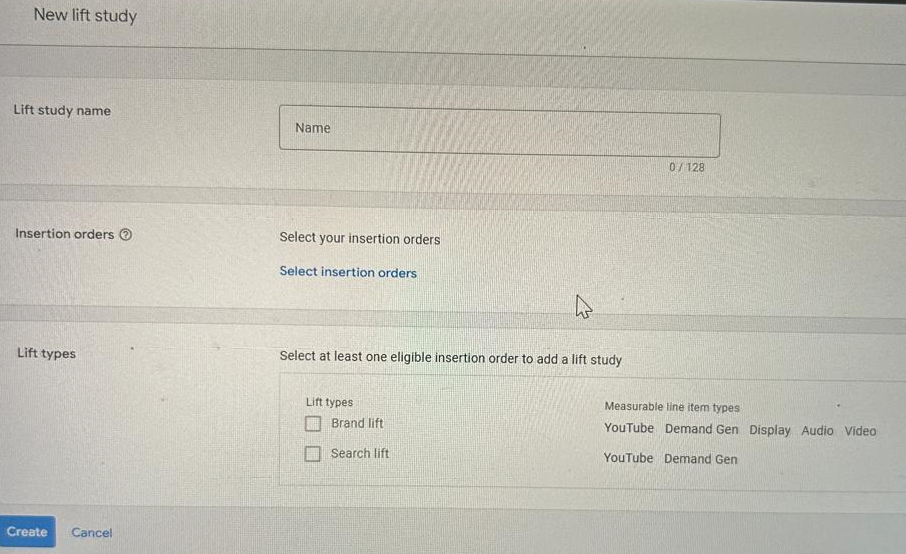
Go Advertiser>Experiments>Create new
1. Give Lift Study Name
2. Select the insertion order
3. Select the lift types
- Brand lift
- search lift
4. Choose 3 Metrics under brand lift
- Video Ad Recall:
- Awareness:
- Consideration:
- Favorablity
- Purchase intent
- Custom(Create your own question)
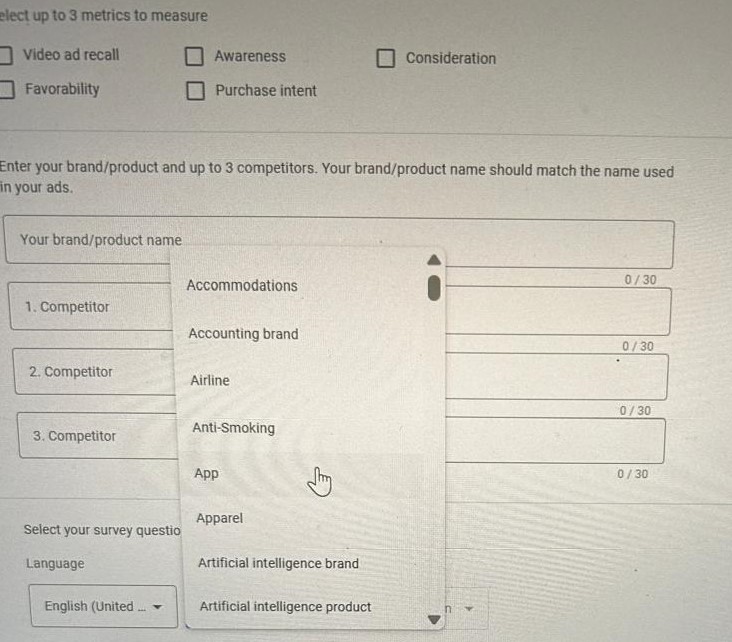
5. Survey details
6. Give your brand name and select upto 3 competatior name
7. Survey settings
- Language
- Object Types
- Intended action
How to check brand lift study results:
Go Advertisr>Experiments>Measurement status column>View report
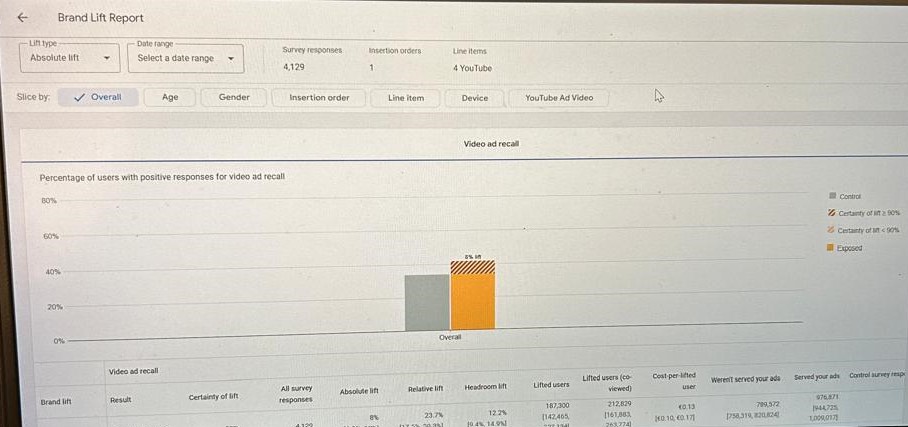
- Absolute Lift: As explained above, when 30% of the audience who didn’t see your ad knew your brand and 20% of those who did saw it, your Absolute Lift is 10%.
- Relative lift: How much percent your brand awareness increased as compared to where you started. Will use the same example (30% to 40%), brand awareness grew by half of its original value, then your Relative Lift is 50%.
- Headroom lift: How much “room” you had left to grow in the market. If your awareness was already 80%, you had only 20% “headroom” to reach everyone. This metric shows how much of that remaining space you managed to fill.
- Lifted users: Actual users who changed their minds after seeing your ads. A very important metric to be part of your reporting. Systme takes the survey percentage and scales it up to your total IO reach, telling you exactly how many thousands of people now remember or consider your brand.
- Lift detected: This metric indicates whether you actually received enough responses to measure. If you want to overcome this, read our explanation above about why lifts fail. In short, based on this metric, DV360 would have enough data (usually after ~2,000 responses) to confidently say the results aren’t just a random fluke.
- Control Survey Response: The survey was collected from people who did not see your ads and were intentionally held back from seeing them to detect the lift.
- Exposed Survey Response: The survey was completed by people who saw your ads.
- Served Your Ads: This refers to the Exposed Group—the audience you actually reached with your campaign.
- Weren’t Served Your Ads: This is the Control Group—people Google purposely “held back” from seeing your ads to act as a baseline for the experiment.
- Control Positive Response Rate: The percentage of people who said “Yes” (e.g., “Yes, I know this brand”) without seeing your ad. This represents your existing “natural” brand awareness in the market.
- Exposed Positive Response Rate: The percentage of people who said “Yes” after seeing your ad. This represents your brand awareness plus the impact of your campaign.
Frequently Asked Questions:
- What is a Brand Lift Study in DV360? A Brand Lift Study is a free tool in DV360 that uses surveys to measure the impact of your ads on consumer perception, tracking metrics like Brand Awareness, Ad Recall, and Purchase Intent.
- What is the difference between the Exposed and Control groups? The Exposed group consists of users who see your ads, while the Control group is a randomly selected segment of your audience that is withheld from seeing your ads to serve as a baseline for measurement.
- How is Absolute Lift calculated in DV360? Absolute Lift is the percentage point difference between the positive response rates of the Exposed group and the Control group.
- What are the minimum requirements for a Brand Lift Study? To get statistically significant results, a study typically requires a minimum budget (varying by region) and enough responses—usually around 2,000—to detect a lift with 95% confidence.
- What does ‘Cost Per Lifted User’ mean? Cost Per Lifted User is a metric that measures the average amount spent to influence a person to remember or consider your brand after seeing your ad.