Table of content:
- Requirement for A/B test on DV360
- How to set up DV360 A/B Test & Experiment
- How to read A/B test results
Every team meeting before the pre-launch of a Campaign is overshadowed by the same what-ifs. What if the creative doesn’t work, what if the audience doesn’t interact enough?
It’s time to throw what-ifs out of the window, as guessing will shoot up your campaign budget.
Let’s move on from whether this will work or not to this will work. Sounds impossible?
Not anymore, DSPs’ platforms such as DV360 are loaded with features, and advertisers can take full advantage of them. They just need to use these features smartly.
One such feature is A/B test on DV360; it just sits there, but most advertisers overlook this and rarely use it. My recommendation after spending a decade in programmatic marketing is to include this in your media plan. This can peak your campaign performance by a minimum 30% if used correctly. So today we will show you how to do the DV360 A/B Test & Experiment setup.
But first, let’s see its use case!
Suppose you want to test if the:
> BUY NOW! blue button works best among your target audience, or the BUY NOW!Red Button. You can do that with A/b Testing on DV360.
> Or you want to test if Movies goes interact more with your ads or Traveller, you can test these as well.
> Or you want to test if the audience is certain pin codes interact more with your ads than other pin codes, you can do that as well.
What I meant to say is that there are numerous use cases for this; you just need to plan what you want to test.
Before we show you how to set up AB test on DV360, let’s learn some important terms you need to know before you set up the test:
1. Arm Name: The “Arm Name” is simply the label you give each path, so you don’t get confused. If I were at you for one Arm 1, I’d give the name as short-form video, and for Arm 2, I’d give the name as long-form video. This would make my reporting much simpler to understand. Think of it as “A” and the “B” in an A/B test.
2. Control Group: You need to select which arm would be your control group. The hack here is to keep that arm as a control group where you run your normal ads as you would do in your regular Campaign. Arm 2 would be where you test the new things, such as the new Red buy button. Control is like the “Before” photo in a weight loss commercial. Without it, you can’t prove your new strategy actually did anything special.
3. Confidence Level: Go for 90%, for 95%, I have seen DV throwing inconclusive results for most 95% confidance level options.
- Here is why confidence level is important: Imagine Arm A has a 1.2% CTR and Arm B has a 1.3% CTR. Without the setting: You see B is higher, so you move all $100,000 of your budget to B. But because it wasn’t “statistically significant,” the next day, B’s performance crashed because it was just a lucky streak. With the setting: DV360 will tell you: “Wait! B is higher, but we haven’t reached your 95% Confidence Level yet. Don’t move the money yet.”
Requirement to DV360 A/B Test & Experiment Setup:
- Keep IO or LI ready before you start the test, as you need it to add on to the test.
- It’s best to test 2 new IOs or LI’s than with one running new and the other one old to avoid any data skewing.
- Schedule the experiment at least 24 hours in advance. Additionally, we recommend running them for at least one month to account for the weekly performance dip.
- While there isn’t a hard “minimum” for standard A/B tests, you need enough volume to reach statistical significance. For Brand Lift Study within an experiment, there are specific 10-day minimum spend requirements (often around $5,000–$15,000, depending on the region).
- Inventory Restrictions: You cannot run experiments on Programmatic Guaranteed (PG) deals or Instant Reserve inventory.
- You can add upto 10 arms for the IO or LI level at max
How to set up DV360 A/B Testing & Experiment
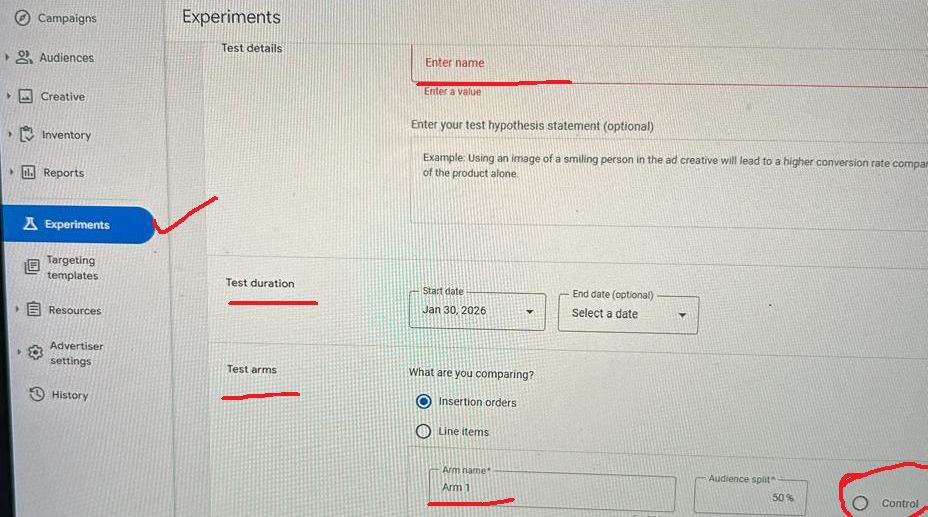
1. Enter Test Name
2. (Optional)Add some description about the test
3. Test Duration: Normally, it is the same as the IO flight date
4. Test arms
- Select either the Insertion order or the Line item
- If you are comparing IO, you must have 2 different IO running
- If you are selecting LI, you can test 2 LI from the existing IO
- Give the arm name: For easy recognisation what you’re testing
6. Select Audience Split percentage. Keep 50% standard split here
7. Measure
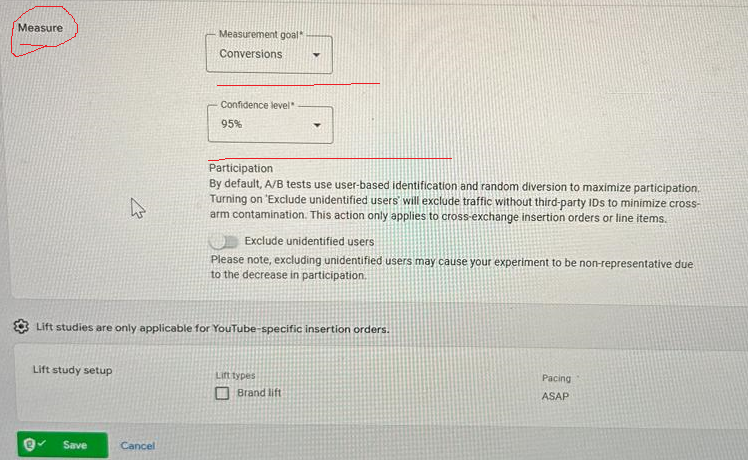
Undet measurement goal, you can measure the following goal:
8. Select Confidence level
10. Save
These tests won’t mean a thing if you don’t know how to read the A/B test results:
How to read A/B test Results:
1. To check results goto Advertiser > Resource > Experiment> A/B Test > Click the test you want to see the results for.
2. Check the top summary card first when you open the report. The report will usually give you a clear winner.
A. The “Status” or “Winner” Label
If it says in progress, you need to wait for more, as not enough data is calculated. If it says statistically significant, which means the the Campaign has picked its winner and will highlight the winner in green. If it says inconclusive, the test ended, the fight between Arm A and Arm B was too close to call, but no one won.
B. The “Lift” Column (The Most Important Number): Lift tells you the percentage difference between your Control group and your Test group.
- Positive Lift (+10%): Your test arm performed 10% better than the control.
- Negative Lift (-5%): Your new idea actually performed worse than your current standard.
- Calculation: If the Control CTR is 1.0% and the Test CTR is 1.1%, your Lift is +10%.
C. The Confidence Interval (The “Error Bar”)
- In the report, you will see a small horizontal line or a percentage next to the lift.
- If that line is entirely on the “positive” side of the zero-axis, you have a solid winner.
- If the line crosses the zero-axis, it means there is a chance the lift is actually zero or negative. This is why you wait for that 95% Confidence you set up earlier to be reached.
3. Summary Checklist for Checking Results:
- Has the experiment reached the Confidence Level (90% or 95%) I set?
- Is the Lift high enough to justify a permanent change?
- Did I check the secondary metrics (e.g., did CTR go up, but CPA also went up)?
Frequently Asked Questions:
- What is an ‘Arm Name’ in a DV360 A/B test? An Arm Name is simply the label you give to each testing path (such as ‘Short-form video’ or ‘Long-form video’) to distinguish between the ‘A’ and the ‘B’ segments of your experiment.
- Why is the Confidence Level important for experiments? The confidence level ensures that your results are statistically significant. It prevents you from moving your budget based on a “lucky streak” by confirming the performance difference wasn’t just a random fluke.
- What are the requirements for setting up a DV360 A/B test? You must have your Insertion Orders or Line Items ready before starting. You should schedule the test at least 24 hours in advance and run it for at least one month to account for performance fluctuations.
- Can I run experiments on Programmatic Guaranteed (PG) deals? No, DV360 experiments cannot be run on Programmatic Guaranteed (PG) deals or Instant Reserve inventory.
- What does it mean if an A/B test result is ‘Inconclusive’? An inconclusive result means the test ended without a clear winner because the performance difference between the arms was too small to reach the required confidence level.