Note: This guide is written assuming you have some familiarity with DSPs or programmatic advertising, not for an absolute beginner in marketing.
Unlike other marketing platforms, the Optimization strategy on DV360 or any other DSP varies slightly. Normally, on other platforms, you would optimize for KPIs such as CPM, CPC, CTR, and CPA. However, on the demand-side platform (DSPs, such as DV360), you also need to optimize for pacing.
On DSPs, pacing and performance optimization work in conjunction and are interdependent. You must have observed that when pacing is poor, the KPI’s takes a hit.
However, one thing is very clear: performance optimization is not a one-day task. You can’t optimize the Campaign one day and expect it to fix the KPIs or pacing. It takes consistent effort; our suggestion is to do it on a weekly basis so the system can adjust to these changes.
Optimization on DSPs, such as the trade desk or Amazon DSP, varies slightly from DV360. But the core of optimization remains the same. So, if you understand how optimization works on DV360, it would be easier for you to comprehend optimization on other DSPs.
We will cover optimization strategies on the Trade Desk or Amazon DSP soon, but today we will focus on DV360. It’s the most widely used programmatic media-buying tool.
Also, if we cover both pacing and performance optimization in one article, you might lose interest, so we will keep performance optimization on DV360 for another day. Here, we would cover pacing optimization on DV360.
We strongly recommend that you read the entire article, as we have covered every pacing optimization strategy. I understand it can be lenghty but once you read and follow the whole article, trust me, you won’t face any pacing challenge ever, at least on DV360. We also request that you leave a comment to let us know your thoughts or queries.
Let’s start!
DV360 Pacing Optimization Strategy:
Before we optimize pacing in the DV360 Campaign, we need to know what type of Campaign it is. Whether it’s a PMP Campaign or an Open Market Place Campaign (OPM).
Since pacing optimization for PMP Campaign would mostly depend on Publisher inventory, and for OMP, it’s mostly on how much targeting you have applied.
Let’s start with the DV360 pacing optimization strategy for the PMP Campaign:
1. Navigate to the troubleshooter and look at the 3 things:
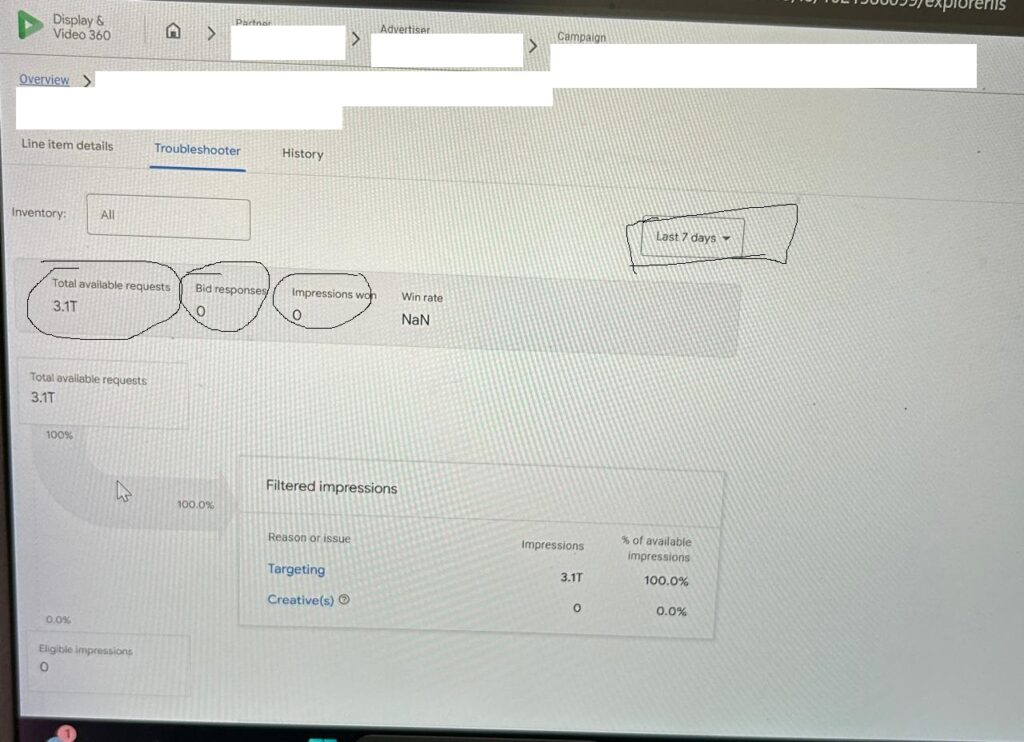
- Total available request: If the total request sent(impression request) is less than 500K or 1 Million on the previous day or at least above 3 million in the last 7 days, it means your publisher is sending very little inventory to bid on. You must contact them to increase the inventory size/bid request. All your optimizations depend on this factor; unless you fix it, none of them will work. This is very, very important.
- Bid Response: Suppose the publisher is sending enough bid requests, but if the bid response is lower, it means you have so many targetings applied. These targeting blocks your bid response to publisher-sent inventory. It’s like your salary; even if it’s high, major deductions are taken due to taxes and other withholdings. From a DV360 perspective, look for targeting such as excessive use of block lists (site exclusion, keyword exclusion), very restrictive viewability, or a low-pool audience. So you need to relax these targeting to increase your bid response. Just like investing our salary to get a tax rebate from the government.
- Impression won: This is dependent on your bid response; if you’re bidding on maximum inventory/impression. Your impression quality would be low if you have restrictive targeting (too much exclusion and other targeting applied).
2. See if you can move some targeting on the Publisher side.
Sometimes, there can be a layer of the same targeting on both the Publisher and the DV360 side. Check with them whether common DV360 targeting is applied on both sides (e.g., geo targeting or brand safety). If it is, remove it from either side. This will open up more inventory and improve your pacing.
3. Do not target any audience for the PMP Campaign
Private deals are already curated using your intended audience during initial planning of deals with the publisher, and further layering it with audience targeting, such first party audeince or in-market or affinity audience,e would choke the overall pacing. So never target any audience on DV360 for a PMP Campaign.
Fixing these 3 issues for the PMP Campaign would significantly improve your Campaign pacing.
Now Let’s see the DV360 pacing optimization strategy for the OMP Campaign.
1. For the open market place (OMP) Campaign, the majority of the time, inventory is not an issue unless you have restricted your Campaign severely by excessive targeting. If inventory is an issue, we need to follow the same approach we discussed above: relax targeting. There is no workaround for this.
2. For the OPM campaign, based on my experience handling multiple accounts, there are 3 things to look at. I have added them in order of importance within the pacing optimization funnel, so you can prioritize which targeting to review first.
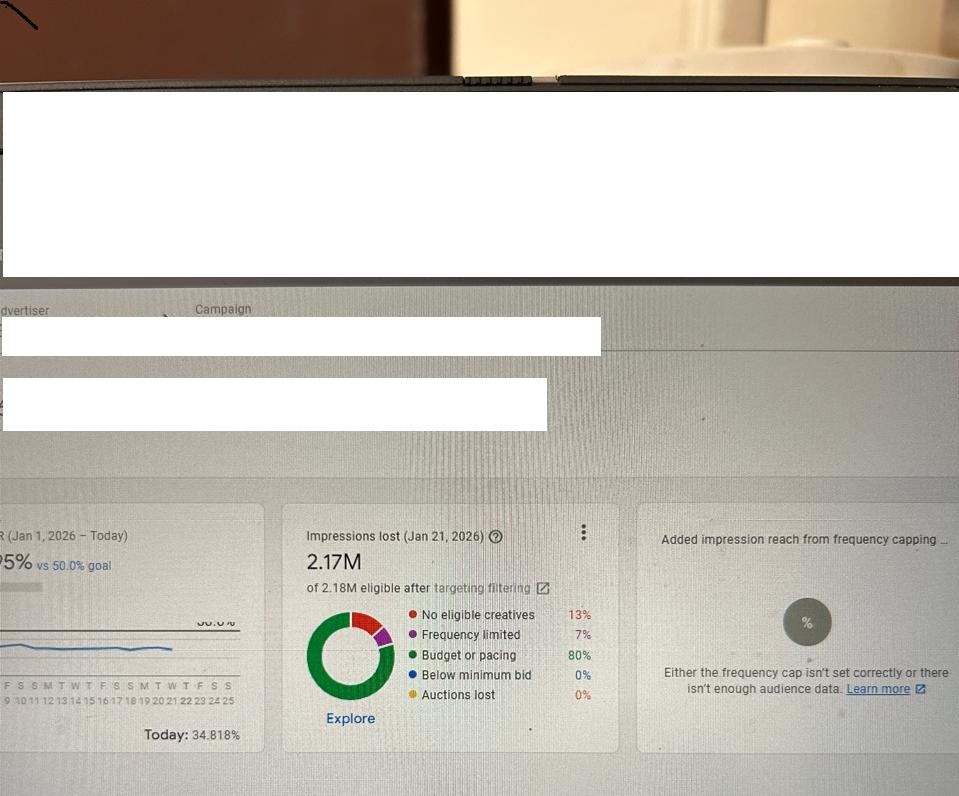
- Auction Lost or below the minimum bid: If the tile at the LI level shows 30-40% lost, or auction loss above 40%, increase your CPM or CPV bids. Do not increase at once; increase 20% first, then gradually increase to see if pacing improves. Note that increasing the bids would also impact the CPM for your Campaign. So proceed with Cautions. To strike a fine balance, consider other ways to improve pacing, as discussed above. If you are running on a tight CPM and don’t want to shoot your CPM further, then you must open up your targeting by removing some exclusion list, or adding more audience, or creating one more line item with a performing audience. This way, inventory would increase, and your pacing would improve, too. Earlier, due to intense competition, you were losing impressions; with increased inventory, competition would decrease. When the competition is high, the CPM shoots up, and when the competition is low, the CPM remains normal.
- Frequency limited: Check frequency cap at Campaign level, IO level, and LI level, and see if you can increase the FC cap from 1 to 2 or from 2 to 3. I recommend increasing frequency at the start of the Campaign rather than the 2nd half of the Campaign/insertion order. At the start of the flight, you should expose your ads more frequently, since by the end of the flight, if you keep showing them, ad fatigue can be so high that users will not want to see them again. Mind you, even if you increase FC cap at LI, the pacing might not improve if you have cap FC at insertion order (IO) or Campaign level. The settings flow in DV360 is top-to-bottom. So you need to relax the FC cap at the Campaign or IO level too.
- Budget or pacing: This is not a major issue in most of the Campaign. But I would strongly suggest calculating the total LI budget and checking whether the daily LI budget exceeds the required daily spend; otherwise, DV360 will flag it as a conflicting setting. Suppose the IO flight budget is 10K, and it should run 30 days, and you have 5 LI’s. The daily budget required to spend daily for each LI would be 66, but my recommendation would be to keep it 70 or 75 so that if any day the IO spends less than required due to any issue, the next day when it spends normally, it will make up for the day when the IO spent less.
- No Eligible creatives: This is easiest to fix, just navigate to LI level and browse down at bottom to see if there are any creatives disapproved, and get them fixed, which solves the creative problem. This issue also reflects from the problem where in the auction, the creative size required was 250×300, but you don’t have that creative size, then DV360 would flag it as no eligible creative, but for the OPM campaign, this issue is almost negligible unless you have a disapproved creative.
3. Look for more Optimization levers related to DV360 Pacing Optimization Strategy.
- Another safe optimization that is often accepted by clients and stakeholders is creating an additional line item. Download the audience performance report, which is a prebuilt template in DV360, or download an instant report and add dimensions such as Audience List, Audience Segment, Demographics, or Geo. See what’s working, and suggest to the client that they have another line targeting these audiences separately.
- Always keep the pacing ahead at the insertion order level, as this will give the system sufficient budget to use throughout the flight rather than be evenly distributed. You can move to Asap in the last week of the campaign if there are chances of underpacing.
- Do not overlayer the Campaign with excessive targeting; try to give some leverage to line item(li) to spend the budget, and see if you can remove some exclusion list or brand safety targeting.
- If you do not get approval to create a new line item, see if you can add more audience in existing line. This would increase the overall audience pool and create more bidding and spend opportunities.
- Another important setting people often overlook is viewability. If you have aggressive viewability settings at the LI level, such as 80% or 90%, your Campaign would struggle to scale. The thumb rule is 70%, but if the pacing is very poor, reduce it to 60 or 50%, but not below that. Viewability is the percentage of your ad that was visible to your end users. If the viewability is set to 70%, it means 70% of your ads was viewable to end users, which is fine, as with 70% view, most of the ad is viewable for users to take any action on it. It is measured as a viewable impression/measurable impression.
Conclusion: Mastering the Art of DV360 Pacing
Mastering DV360 Pacing Optimization Strategy is not a “set it and forget it” task—it is the fine art of balancing targeting fluidity with inventory scope. Whether you are navigating the high-stakes environment of Private Marketplace (PMP) deals or competing in the vast landscape of the Open Auction, your pacing strategy dictates your campaign’s health.
By moving beyond standard “Even” pacing and embracing advanced tactics—such as front-loading for high-impact launches, utilizing “Ahead” pacing to secure premium PMP slots, and leveraging automated bid multipliers—you transition from a passive trader to a strategic architect of your media spend.
Frequently Asked Questions:
- Why is pacing optimization important in DV360? Unlike other platforms, pacing and performance in a DSP like DV360 work in conjunction. When pacing is poor, your KPIs often take a hit, so consistent weekly effort is required to maintain a healthy campaign.
- How do I fix pacing issues for a PMP campaign? Check the troubleshooter for low bid requests or restrictive targeting. You should also ensure there isn’t overlapping targeting on both the publisher and DV360 sides and avoid adding extra audience layers to private deals.
- What should I do if my OMP campaign is losing auctions? If your auction loss is above 40%, you may need to increase your CPM or CPV bids by about 20%. Alternatively, you can open up targeting by removing exclusion lists or adding more performing audiences.
- How does the frequency cap affect pacing? If you have a restrictive frequency cap (like 1 per day), your pacing might struggle. Relaxing the cap at the Campaign or IO level is often necessary because settings in DV360 flow from top to bottom.
- What is a safe viewability setting for better pacing? The thumb rule for viewability is 70%. However, if your campaign is struggling to scale or spend its budget, consider lowering the setting to 60% or 50% to open up more inventory.