Programmatic media buying and upper-funnel campaigns (brand awareness campaign) are a perfect match—a sentiment shared by most performance marketers today. Wouldn’t you agree?
Traffic and conversion campaigns have their place, but awareness is the heart of programmatic media buying. For 90% of the campaigns I have run, the goal is simple: maximize visibility and own the upper funnel.
For awareness, CPM is king. But remember: your CPM isn’t set in stone. If you optimize your campaign well, you can save some costs, ensuring your budget focuses on impact rather than just ‘paying the DSP fees‘.
So, today we will give you some proven tips to optimize CPM for your Campaign. I understand you may be working on multiple DSPs, but today we will focus on optimizing DV360 campaigns for CPM. However, most of the tips would also work for other DSPs.
Table of contents:
One more thing before we start:
CPM optimization in DV360 differs between Display and Video Campaigns. While both use the same auction environment in DV360, the “levers” you pull to lower your costs or increase quality are unique to each format.
For display, you optimize for visibility and clickability, whereas for video, you optimize for engagement and duration.
Here’s the core difference between Display and Video Campaign on DV360
| Feature | Display Optimization | Video Optimization |
| Primary Goal | Viewability & Reach | Completion Rate & View-through Rate |
| Inventory Focus | Placement: Above-the-Fold (ATF) vs. Below-the-Fold (BTF). | Environment: In-stream (YouTube/TV) vs. Out-stream (Web articles). |
| Bid Strategy | vCPM (Viewable CPM): Prioritize ads that are 50% on-screen. | CPV (Cost Per View): Bidding based on users watching 30s or to the end. |
| Device Strategy | Mobile Web/App usually has the lowest CPM. | CTV has the highest CPM but the best completion rates. |
| Creative Fatigue | Monitored via CTR drop-off. | Monitored via Video Completion Rate (VCR) drop-off. |
Let’s start!
How to optimize DV360 campaigns for cpm
1. CPM Optimization for Programmatic DV360 Display Campaign:
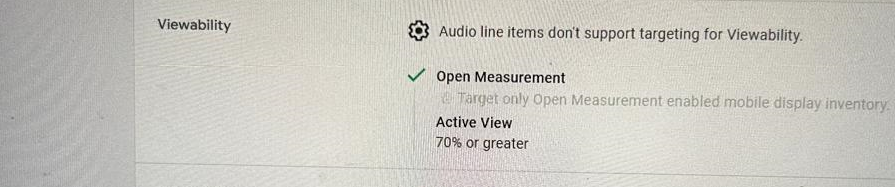
- Expand your inventory: This suggestion applies to both Display and Video Campaigns. I covered this first because it is the most overlooked optimization among traders. Even if you are restricted from opening targeting, you must find a way to access it. If you run your campaign on tight targeting, the competition increases, when competition increases, the demand for an impression increase,s and you end up paying more for that impression, which will shoot up your CPM’s. A safe way to expand targeting is to increase the target audience list, identify similar audiences to those currently being targeted, and add them. This would increase the inventory and reduce competition. Reduce the viewability targeting: if it’s set to 80%, set it to 70%; if it’s at 70%, set it to 60%. See if you can create another line item targeting only best performing creative and audience.

- DV360 Frequency Capping: If your FC is very tight, that is, 1 per week or 2 per week, you would drive up competition. With these FC settings, you are instructing DSP/DV360 to bid only on new and unique users, once or twice per week. Almost every advertiser wants that fresh reach impression. Because the demand is highest for the first impression, the CPM would normally be higher. But if you set up FC to 5 per week or 6 per week, you are telling DV360 that you don’t mind showing your ads to the same users more than twice to thrice per week. The demand for ad exposure on the 4th or 5th exposure is lower than for the first exposure.
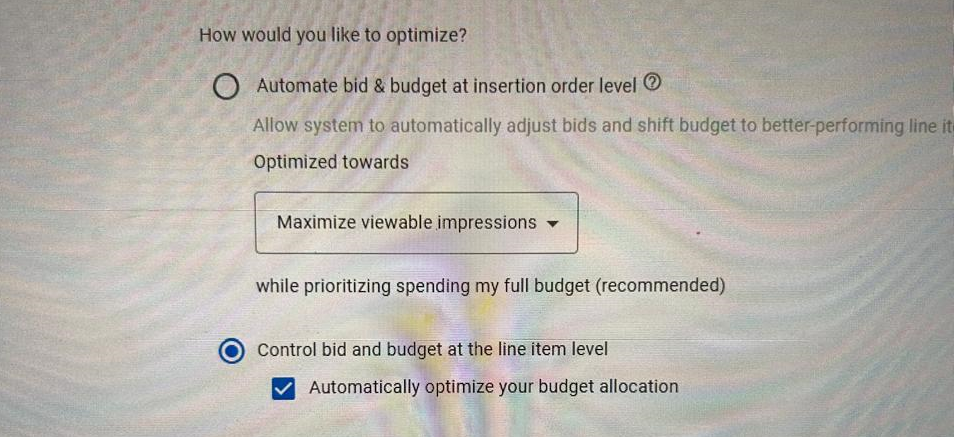
- DV360 automated bidding: Switch to Auto budget allocation if the KPI is set as CPM at the IO level. This is the most underrated optimization strategy that most traders overlook. When you switch to auto budget allocation, DV360 allocates more budget to the line item with the lower CPM and reduces the budget for higher-CPM line items. 1. For this option to work better, you must have at least more than 1 line item to allocate the budget automatically. 2. You must set CPM as a KPI at the IO level.

- Format Selection: Standard banners (300×250, 728×90) are high-volume and cheap. If you optimize for high-impact formats like “Interstitials” or “Skins,” your CPM will naturally double or triple.
- DV360 Display campaign targeting exclusions: You must block expensive inventory. How to find expensive inventory: download a report that includes placement URLs, device targeting, browsers, OS, and region targeting, and look for targeting where CPMs are higher than your booked CPM. Do not block all at once; look for those with very high impression delivery and CPM. See if you can block some of them. Do not block everything with high impression delivery and high CPM, as it would impact your Campaign pacing. If you block most impressions, pacing would take a hit, and your CPM would also increase since low inventory would increase competition.
- The CTR-CPM Correlation: In many programmatic auctions, if your display ad has a high Click-Through Rate (CTR), the algorithm views your ad as “relevant” and may reward you with a lower floor price to win the impression.
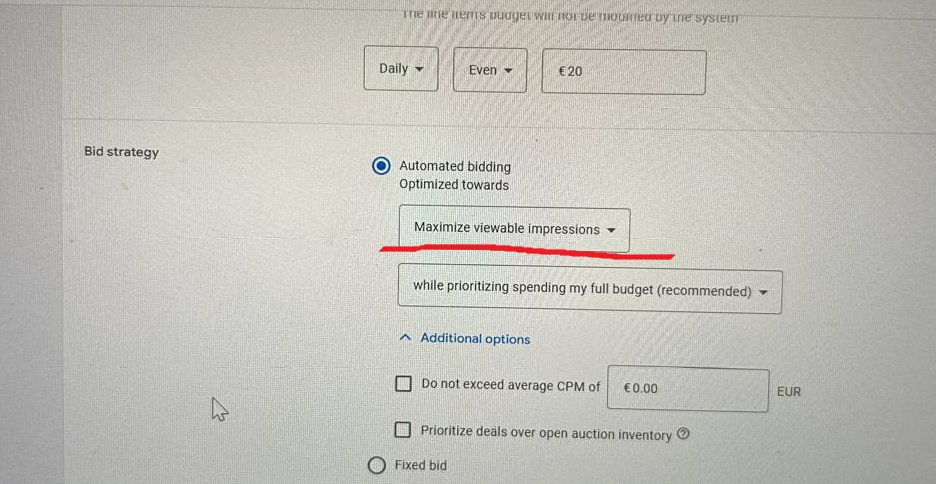
- DV360 automated bidding: For CPM campaigns, always use Maximize Viewable Impressions as the bidding strategy. Then select “do not exceed average CPM of box” and enter your CPM target. This would instruct DV360 to bid only on above-the-fold placements while keeping the target CPM you provided in mind. This way, you would not bid on low-premium inventory.

2. CPM Optimization for Programmatic DV360 Video Campaign:
- Improve the first 3 to 5 seconds of the video: For a video campaign, the DV360 algorithm monitor view rate. If your target audience skips your video within the first 3 to 5 seconds, the algorithm will bid higher to increase completion and view rates. This would shoot up your CPM’s. How to know if people are skipping your ads in the initial phase? Just download a video completion report and see the drop from first-half completion to mid-completion. If it’s very high, it’s your clue.
- Choose Video format wisely: Non-skipping ads have a higher CPM because they guarantee video completion, whereas skip ads allow users to skip the ad. Also, standard web video ads have lower CPMs than YouTube, but CTVs are more expensive than YouTube. So choose ad placment wisely.
- Use the Maximize completed views bidding strategy: With this strategy, you tell DV360 to ensure audiences actually see your ads. Without this bidding strategy, you would be buying inventory where users may not see your ads, or they might see them in the background.
- Run shorter videos: Shorter videos have a higher completion rate, signaling to the algorithm higher engagement. With high engagement, the algorithm optimizes your CPM lower.
- Investigate the data: Download a granular report including Placement URLs, Device, OS, Browser, and Region. Exclude targeting segments among these, such as URLs, where the actual CPM significantly exceeds your Booked CPM. Focus specifically on placements that have both high impression delivery and high CPM.
- Apply “Surgical” Exclusions: Do not block everything at once. Start by excluding the most expensive, low-performing outliers to avoid killing your scale.
- Protect Your Pacing: Over-blocking leads to inventory scarcity, which triggers higher auction competition and drives your CPM even higher.
Bonus tip that works well for CPM optimization:
- A/B Testing: The current CPM that you record in your Campaign is heavily influenced by your insertion order historical data. On DV360, “Bid Shading” algorithms analyze your past winning bids to predict the lowest possible price needed to secure a specific inventory. Historically, if you have a track record of winning bids at a lower price, the DSP will optimize your bids to maintain that efficiency without sacrificing performance. Always run an A/B test on DV360 and a brand lift study to determine which creative or audience type works best for your Campaign, and run similar creatives or audiences to improve CPM.
Note: Another thing to note about Bid Shading is that it is specifically designed for First-Price Auctions. In this type of auction, you pay exactly what you bid. If you don’t have a bid shading concept in place, you might bid $20 for a slot that could have been won for $10.00. Platforms such as DV360 use your insertion order historical data to “shade” that $20.00 bid down to something closer to the market value to protect your margins.
Frequently Asked Questions:
- How does expanding targeting help lower CPM in DV360? Running a campaign on tight targeting increases competition for specific impressions, which shoots up your CPM. Expanding your audience lists reduces competition and lowers your costs.
- Why should I avoid very tight frequency capping for CPM optimization? Tight frequency capping (like 1 per week) forces the DSP to bid only on the first “fresh” impression for unique users, which is the most expensive. Relaxing the cap to 5 or 6 per week allows you to bid on later exposures with lower demand and CPM.
- What is the best bidding strategy for a DV360 Display CPM campaign? For Display, you should use the ‘Maximize viewable impressions’ bidding strategy. This tells DV360 to prioritize ‘Above the Fold’ placements while staying within your average target CPM.
- How does the first 5 seconds of a video affect my CPM? If users skip your video in the first 3 to 5 seconds, the DV360 algorithm perceives a low view rate and may bid higher to maintain performance, which increases your CPM. Improving the intro can help keep your CPM lower.
- Should I block all high-CPM inventory to optimize my campaign? No, you should only apply “surgical” exclusions. If you block too much inventory at once, you create scarcity, which increases auction competition and can actually drive your CPM even higher.