Table of Contents:
As a programmatic trader, one of my roles is to help reduce clients’ costs.
If you have handled any cost-based Campaign KPI—whether it’s CPM, CPC, CPV, or CPA—you would know that proper optimization is important to maintain peak performance and reduce costs for our clients.
If you’re finding it challenging to hit your targets, I’m here to help guide your strategy. I previously shared a deep dive into DV360 CPM optimization; today, we’ll shift focus to the performance end of the funnel: how to optimize your DV360 campaigns for CPA.
Today, I’ll share 13 CPA optimization strategies that have worked for me in the past. I’ll also share some bonus tips towards the end of the article and FAQ’s to cover any missed queries you might have. So, make sure to read the whole article so that you don’t miss any important points.
But, stop!
Before we kick off CPA optimization on DV360, your campaign needs more than just a budget—it needs a solid foundation. To hit peak performance, make sure these three non-negotiables are locked in first:
The Pre-Launch Checklist to Optimize DV360 Campaign for CPA
1. Bulletproof Tracking: You must have Floodlight tags active on your site. This isn’t just about counting sales; it’s the heartbeat of your campaign that feeds conversion data back to DV360 and builds your first-party data powerhouse.
2. Data Fuel (Historical Performance): While not strictly mandatory, having historical conversion data is a game-changer. The more data the system has from past campaigns, the faster your bidding strategy can “learn” who your real buyers are.
3. The 15-Day Rule: Conversions aren’t a “short burst” game. Your flight duration should be at least 15 days. Why? Because the DV360 algorithm needs time to crunch the numbers, learn from user behavior, and optimize for those high-value actions.
Now, let’s start to with DV360 Campaign optimization for CPA
1. Use Aumoated Bidding Strategy: Conversion-based campaign must use an automated bidding strategy. For the Conversion Campaign, start with Maximize Conversion for 10 to 15 days, then, if you see conversions, switch to target CPA.
- Maximise Conversion: This bidding strategy instructs the algorithm to maximise conversions without regard to cost.
- Target CPA: This bidding strategy tells the system to maximum conversions while staying within the set CPA target. Suppose you set a taget CPA of $10. The system would ignore bidding on audiences where it thinks the CPA would exceed $10 and bid aggressively on audiences where it thinks the CPA would be below $10. How to know what tCPA you should keep for your Campaign. Look for the last 30 CPA reports and keep them as your target.
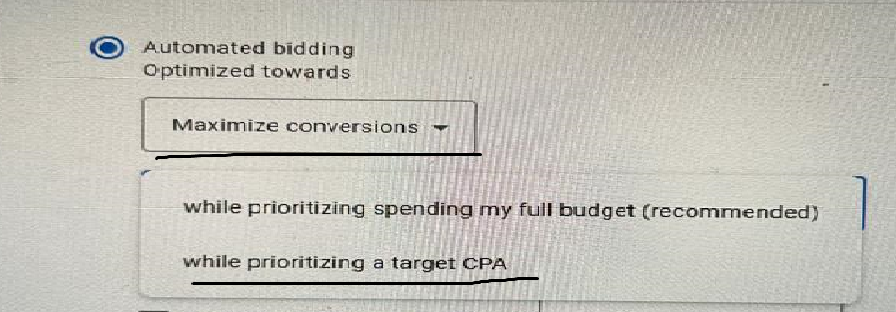
2. Use tCPA smartly: During the initial launch of the Campaign keep CPA twice the actual CPA that you have achieved in your older Campaign to help the bidding strategy with more learning and adjustment. Then, in a few days, you can reduce this CPA to your actual target.
3. Use first-party data: This is a must for conversion-based conversion. Target add-to-cart, cart abandoners, or at least product viewers, and exclude past converters.
4. Get more conversions:
On DV360, a high conversion rate is your best friend. High conversion volume and drop in CPA are directly proportional—one feeds the other in a powerful feedback loop.
- Signals for the Win: Every conversion acts as a high-intent signal, telling the DV360 algorithm exactly who your buyers are.
- Aggressive Bidding: As conversion data builds, the system gains the “confidence” to bid more aggressively on similar high-value users, winning the right auctions for less.
- The CPA Drop: This increased efficiency scales your results—bringing in a higher volume of conversions while simultaneously driving down your average CPA.
5. Use frequency cap effectively: Don’t overexpose your ads and don’t underexpose too. If you run a reach Campaign under exposure would work since you want to reach more unique users. But, this is not the case for conversion campaigns; the FC cap should be high but not very high, let’s say 3 per day or 2 per day should do the job, or you can stretch to even 4 per day if you are targeting cart abandoners.
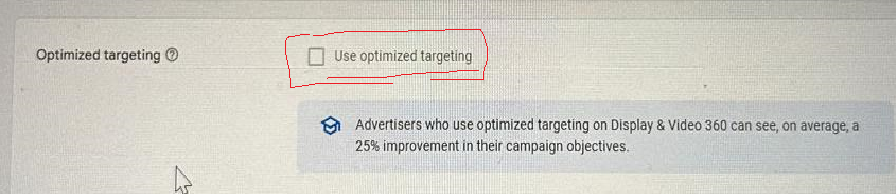
6. Use Optimized targeting: This is the most important feature introduced by DV360 to optimize DV360 Campaign for CPA and to scale conversion campaigns. It works best for conversion-based campaigns. Give your Campaign some seed audience, then select the optimized targeting option in DV360 for that audience. It will find more audience outside of your seed audience who are most likely to convert. It uses the conversion signal from your Campaign to identify users likely interested in your product and to improve the likelihood of your conversion.
7. Improve your site speed: The user experience on your site plays a critical role in a high conversion rate. Make sure your site loads quickly and has proper navigation so visitors can find what they need quickly. Run some discounts and offers to provide a much-needed boost.
8. Use DCO creative: Using dynamic creative optimization increases your chance of users converting more through ads. This optimizes the creative in real time using visitor browsing history and implements an appropriate CTA.
9. Set Viewability: Set the viewability settings to a minimum 60% and above. If your ads are not seen by your audience, they are less likely to click, which will impact your conversion performance.
10. Run A/B testing or experiment: Unless you know which CTA is working or which audience is working better, or which color or which button is working well, you would be wasting money on irrelevant ad spends. Set up A/B testing in DV360 and test various ad elements or audience segments. Such as, in one IO, keep a different audience, and in another, a different audience. In one IO, keep green text on ads and in the other, keep red text on the creative, and see which color the audience interacts with more.
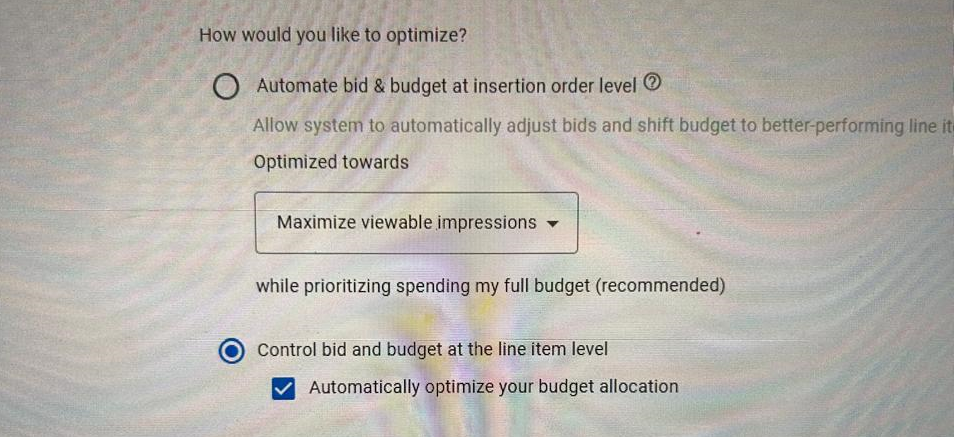
12. Switch to Auto budget allocation: If the KPI is set as CPA at the IO level. This is the most underrated option to optimize DV360 Campaign for CPA that most traders overlook. When you switch to auto budget allocation, DV360 allocates more budget to the line item with the lower CPA and slows the budget for higher-CPA line items.
- For this option to work better, you must have at least more than 1 line item to allocate the budget automatically.
- You must set CPA as a KPI at the IO level.

13. DV360 campaign targeting exclusions: To optimize the DV360 Campaign for CPA, you must also block expensive inventory. How to find expensive inventory: download a report containing placement URLs, device targeting, browsers, OS, and region targeting, and look for targeting where CPAs are higher than your booked CPA. Do not block all at once; look for those with very low conversion rates and very high CPAs. See if you can block some of them. Do not block everything with low conversion and high CPA. If you block many, the pacing would take a hit, and it would also drive up your CPM, since low inventory increases competition.
Bonus tips:
A/B Test: Don’t miss the underrated feature on DV360, check what’s working and what’s not working for your Campaign by running an A/B test and brand lift. This would give you an idea of where to allocate more budget to get the maximum results.
Frequently Asked Questions:
- What is the pre-launch checklist for DV360 CPA optimization? Before kicking off CPA optimization on DV360, your campaign needs a solid foundation, including bulletproof tracking with active Floodlight tags, historical conversion data, and a flight duration of at least 15 days.
- How does Maximize Conversion bidding work? This bidding strategy instructs the algorithm to maximize conversions without regard to cost.
- What is Optimized targeting in DV360? It works by identifying additional audience segments outside your seed audience who are most likely to convert, based on conversion signals from your campaign, to increase your conversion likelihood.
- Why is the 15-day rule important? The 15-day rule is important because the DV360 algorithm needs time to crunch the numbers, learn from user behavior, and optimize for those high-value actions.
- How does Auto budget allocation help with CPA? When you switch to auto budget allocation, DV360 allocates more budget to the line item with the lower CPA and reduces the budget for higher-CPA line items.