Last updated: August 2026. Written from hands-on DV360 campaign builds across ecommerce and SaaS accounts — not a rehash of Google’s help docs.
YouTube brand awareness & reach campaigns confuse most advertisers — different creative lengths, ad types, buy types, plus new formats like Shorts and in-feed targeting that Google keeps adding.
Here’s the short version: what you’re setting up is officially called a Video Reach Campaign. It’s Google’s umbrella term for every reach format in DV360 — Efficient Reach, Target Frequency, and Ad Sequencing all live under it. Same campaign, same setup screen, different name depending on which Google doc you read.
Below is the cheat sheet I use to keep the formats straight, plus the exact steps to set one up.
Your Video Reach Campaign Format Cheat Sheet:
Six formats live under the Video Reach Campaign umbrella. Here’s what each one actually does, and when Google recommends it.
| Line Item Sub | Ad Types/ Format | Recommended Creative Length | Max Creative Length | Buy Type |
| Non Skippable Reach | Non Skip Ads | 7-15 seconds | 15 | CPM |
| Non Skippable Reach | Non Skip Ads | 16-30 seconds | 30 | CPM |
| Non Skippable Reach | Bumper & Non Skip Ads | 5-15 seconds | 15 | CPM |
| Efficient Reach | Bumper, Skippable, Shorts & Infeed | 5 seconds or longer | Not recommended above 3 minutes | CPM |
| Target Frequency | Bumper Skippable & Non Skippable | 5 seconds or longer | Not recommended above 3 minutes for skip ads | CPM |
| Ad Sequence | Bumper Skippable & Non Skippable | 5 seconds or longer | Not recommended above 3 minutes for skip ads | CPM |
Which Format Fits Your Goal? (Plus What to Measure)
Now flip that around: which one fits what you’re actually trying to achieve, and what should you be watching in your reports once it’s live?
| ine Item Sub | Ideal KPI’s | When To Use |
| Non Skippable Reach | CPM Or VCR | Looking to convey your msg with longer videos. DV360 would accept even less than 6 seconds of video, but the recommended length is above 7 seconds |
| Non Skippable Reach | CPM Or VCR | Best for CTV ads. Creative length shorter than 16 seconds won’t be accepted |
| Non Skippable Reach | CPM Or VCR | If you want to test Bumper with non skip. The ad type/format would be automatically determined based on the length of the video creative |
| Efficient Reach | CPM | Looking for efficient impressions and reaching more unique users at a lower CPM. The ad type/format would be automatically determined based on the length of the video creative |
| Target Frequency | CPM Or VCR | As the name suggests, if you are not meeting the required ad Frequency from other ads, this type of ad would help meet your desired ad frequency. It will aim to reach the target ad frequency, but this isn’t guaranteed. Note. You can create either a bumper and skip ad group or a non-skip ad group, but not both at the same time. |
| Ad Sequence | CPM Or VCR | Best to share brand story, build brand interest, or reinforce a message over time |
What Is Efficient Reach in DV360, Exactly?
Efficient Reach is a bid strategy, not a creative format.
Its one job: get your ad in front of the maximum number of unique people, at the lowest possible cost per person reached.
DV360’s AI does this by mixing your ad automatically across skippable in-stream, non-skippable, bumper, and in-feed formats.
You don’t pick the format. The system picks it, per impression, based on what’s cheapest to deliver reach with at that moment.
That’s the trade-off worth understanding before you launch:
Choose Efficient Reach when your goal is broad awareness on a fixed budget, and you don’t care which format shows — you care how many different people saw something.
Choose Target Frequency instead when you need control — for example, you know from testing that 3 exposures in 30 days is your sweet spot, and going over that wastes budget.
Choose Ad Sequencing instead when you’re telling a story across multiple videos and the order matters — teaser, then explainer, then offer.
How Efficient Reach Bidding Actually Works
You set a target CPM.
DV360 spends your budget trying to buy as many unique-user impressions as it can at or under that CPM, across the eligible formats.
It’s optimizing for reach, not frequency and not clicks — so don’t judge this line item by CTR. Judge it by unique reach and cost-per-reach, in the DV360 reporting panel.
How DV360 Ad Sequencing Works, Step by Step
Ad Sequencing lets you show viewers a set of videos in an order you control — not random, not repeated. A story, not a rerun.
Here’s the structure Google uses under the hood, and it matters for how you build it:
Each step in your sequence is its own ad group. Each ad group holds exactly one video. You can’t stack multiple videos in a single step.
A viewer moves to the next step based on a condition you set — they saw an impression, they watched the video, or they skipped it. You choose which.
Google ships four ready-made templates, and honestly, starting from one of these beats building from scratch:
Introduce & Reinforce — one long video, then one short follow-up.
Prompt & Inspire — short video first, long video second.
Attract & Direct — short, then long, then short again.
Engage & Differentiate — four short videos in sequence.
Three Rules That Trip People Up
Ad Sequencing only runs on Target CPM bidding. No other bid strategy is available for it.
Targeting lives at the line item level only. You can’t set different audience targeting per step in the sequence.
Frequency capping resets the whole sequence for a viewer every 7 or 30 days — pick whichever matches your purchase or consideration cycle.
You Know the Formats. Now Let’s Build the Campaign.
1. To set up a DV360 YouTube brand awareness & reach campaigns in the most fun way. Let’s start!
2. Use an existing IO(insertion order) or create a new one. You can also duplicate existing IO to save some time.
3. Assuming you’ve created a new IO. Once under IO, click create new line item, then select YouTube.
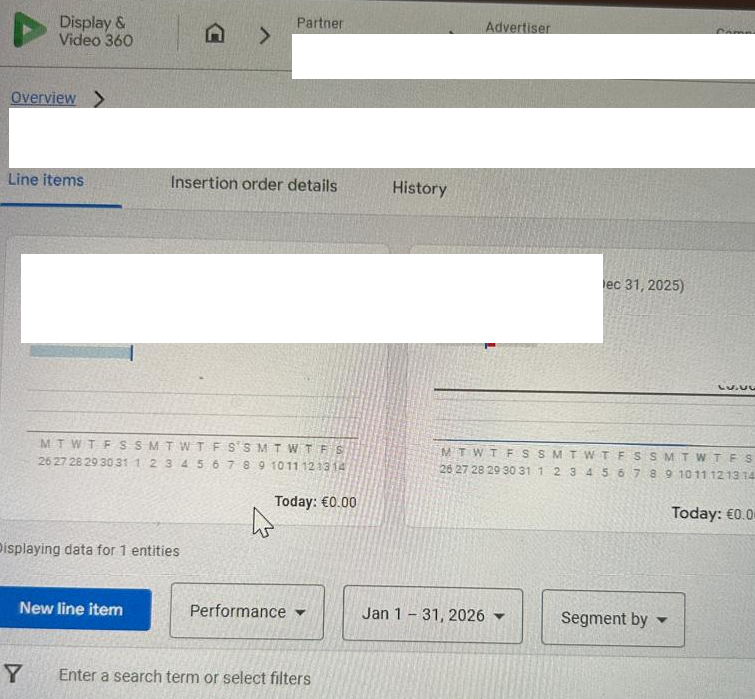
4. Choose ‘YouTube & partners video’.
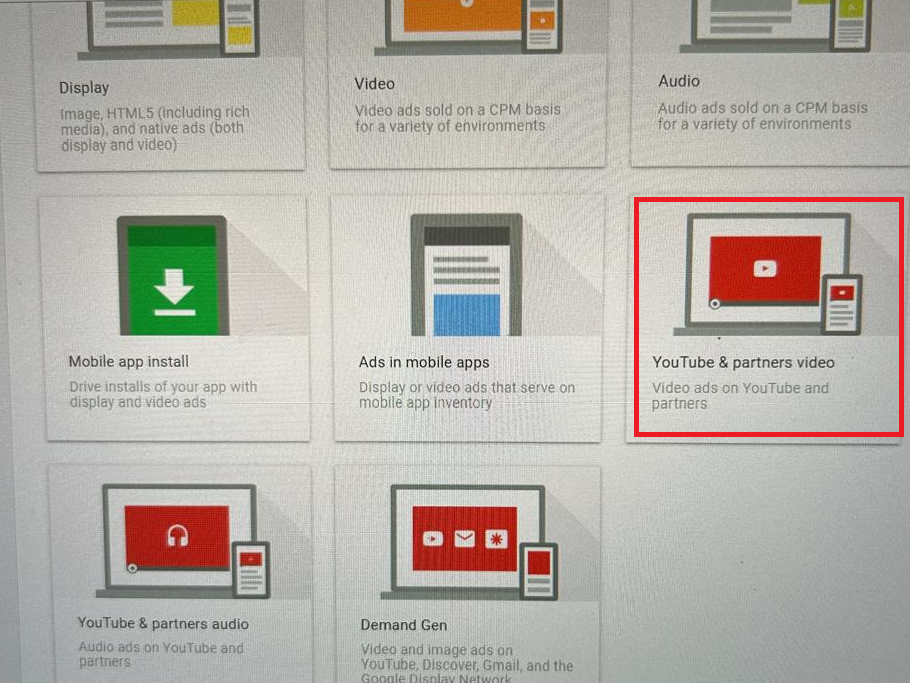
- Now, fill in a few quick details:
- Give your line item a catchy name—something you’ll actually remember. (Example: ‘Epic Cat Videos Summer 2026’)
A Naming Convention That Saves You Pain Later
“Epic Cat Videos Summer 2026” is memorable. It’s also useless six months from now when you’re filtering 40 line items in a report.
Use a structure instead. Something like:
[Client]_[Objective]_[Format]_[Flight Dates]_[Geo]
Example: Acme_ReachAwareness_EfficientReach_Q3-2026_US
Two reasons this matters more than it seems:
First, DV360 won’t let you reuse an identical name on an active item — a consistent pattern avoids the awkward “Copy of Copy of…” naming drift.
Second, and this is the one people miss: your DV360 campaign and line item names can flow straight into GA4 through UTM parameters or the DV360–GA4 integration.
That means a messy DV360 name becomes a messy value in your GA4 acquisition reports — including dimensions like First user campaign, which pulls whatever name you gave the campaign at the source.
Name it clean in DV360, and your attribution reporting stays clean downstream. Name it “Epic Cat Videos,” and that’s what your CMO sees in the dashboard.
- Set your goal to ‘Brand awareness and reach‘—that’s ad-speak for ‘let’s get famous.’
- Select ‘Efficient reach‘ as the type.
Decided on Target Frequency or Ad Sequencing instead, based on the guide above? Pick that goal type here — the rest of this flow works the same way. Ad Sequencing has a couple of extra steps of its own, covered in the Ad Sequencing section above.
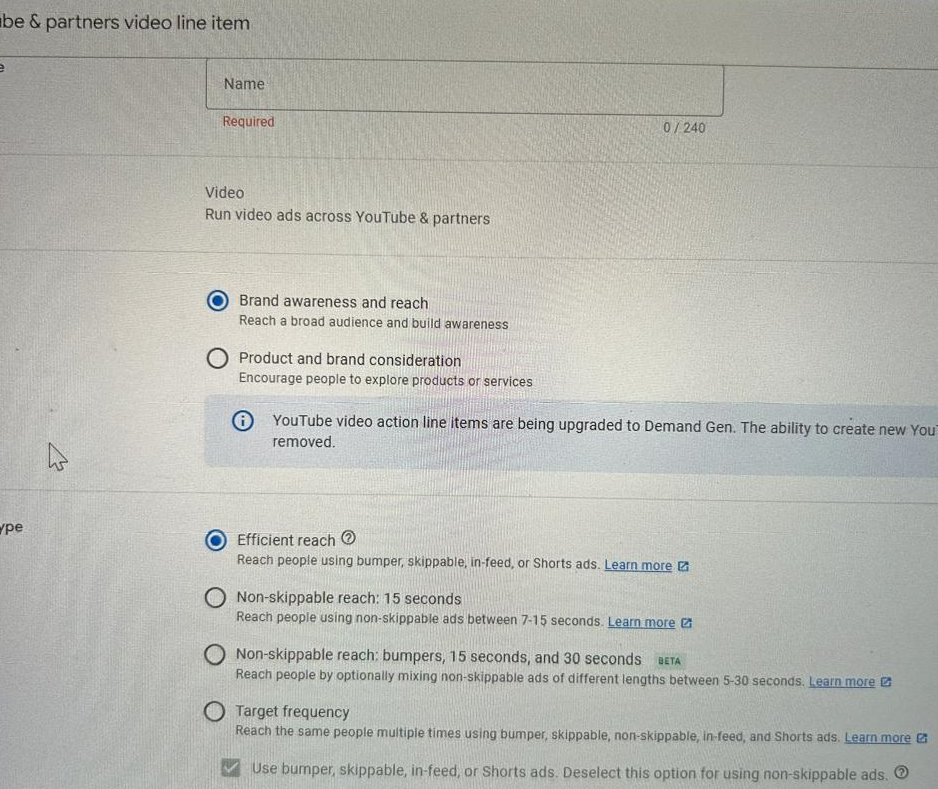
5. Hit Next. If you want, you can tweak which ad types you want to use. Such as picking shorts, or in feed or skippable.
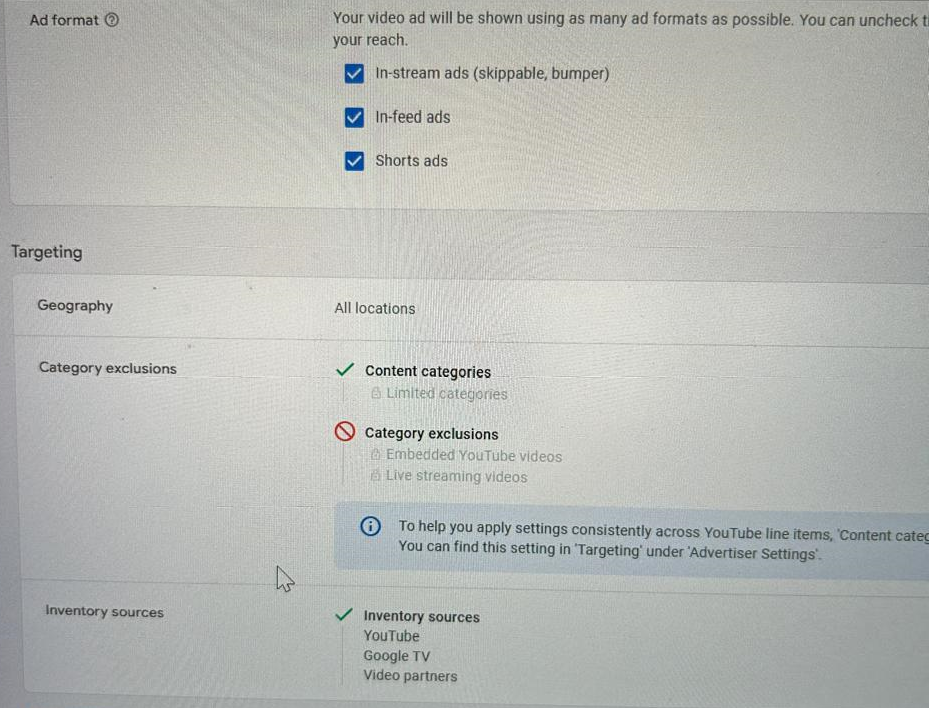
Dial In Your Targeting, Budget, and Flight Dates
6. Targeting: Click ‘Add targeting‘ to pick your perfect audience. (Example: Only dog lovers in New York!) You can get even more precise later.
- Select the device targeting
7. Set things like dates, budget, and extras. Very easy on-screen instructions.
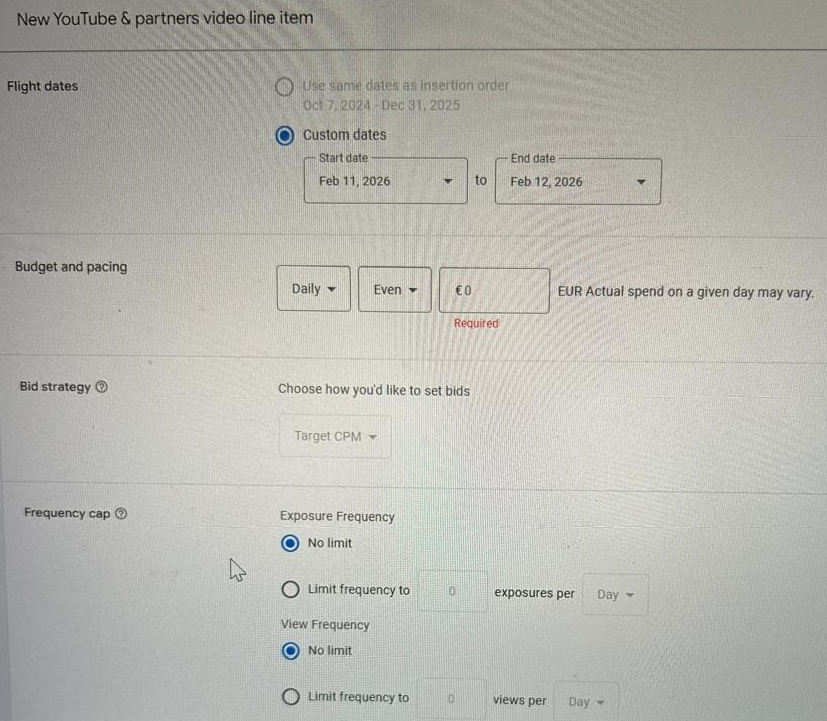
- Pick your flight date(start and end date). Want it to run all summer? Or just for one wild weekend? Your call!
- Set your budget (how much you want to spend), and choose if it should spend daily or all at once. Heads up: you can’t switch this later, but you can change the amount.
- (Optional) Set a frequency cap—this is ad-speak for ‘don’t annoy people by showing the same ad 900 times.’
- (Optional) Want to show off your products? Add a product feed here.
Create a DV360 YouTube ad group and ads!
1. Click ‘Create new ad group‘ to start—think of this like naming your cricket team.
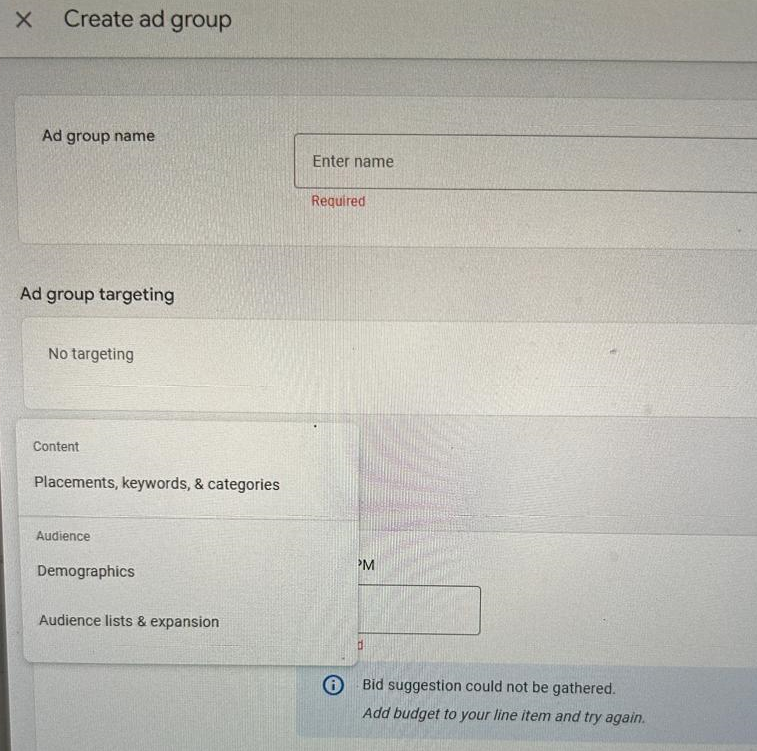
2. Give your ad group a memorable name. (Example: ‘Late Night Snackers’)
3. Click ‘Add targeting‘ if you want to get super specific about who sees your ads. (Example: Only people who love pizza and live in Chicago!)
4. Set your target CPM bid—basically, how much you want to pay for every 1,000 times your ad pops up. (Example: $2.50 per thousand views)
5. Click ‘Create new ad‘ to choose the YouTube video you want to advertise.
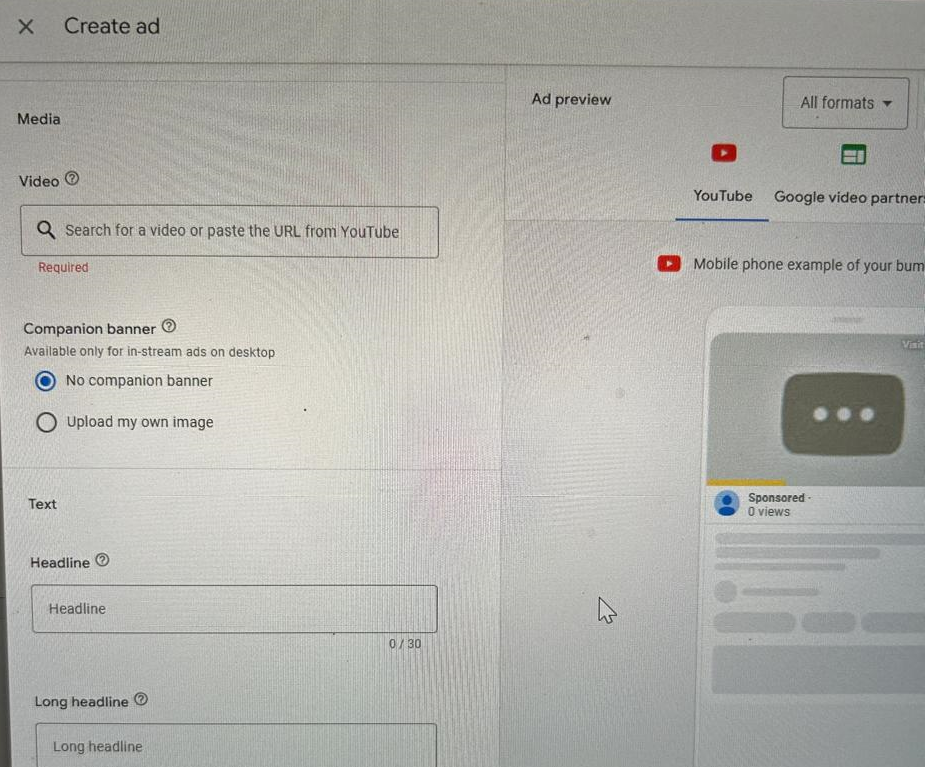
- Name your ad something cool. Use the tag sheet shared from the CM360 team to name it, or feel free to add any name you see fit.
- Search for the YouTube video you want, or just paste the link. The system will figure out the format automatically—no math required.
- (Optional) In the ‘Preview’ area, you can see exactly what your ad looks like—try out different formats, devices, and networks. (It’s like trying on outfits before a big date!)
- Want to see your ad in every possible style? Click the ‘All formats‘ dropdown and check them out.
- Select a network to see how your ad will appear on YouTube, partner sites, or wherever else it might show up.
- Click the device icons to see how your ad will look on a phone, tablet, or computer. (Spoiler: it’s usually awesome everywhere.)
- Click ‘Preview ad on YouTube‘ to see your creation in action on YouTube itself.
- Click ‘Copy link‘ to grab your ad’s YouTube URL.
- For the ‘Companion banner,‘ add any image of the required size.
- Add the LP where you want people to land after they click. (Example: yourshop.com/sale)
- (Optional) Add a call to action—something short and punchy like ‘Shop Now’ or ‘Watch Free.’ You’ve got 10 characters—make them count!
- (Optional) Write a short, catchy headline. (Example: ‘Get Fit Fast!’)
- Add a longer headline and description to really sell your stuff. You get up to 90 characters, so go wild!
- (Optional) Want to track clicks? Add a click-tracking URL (make sure it points to the same destination as your landing page). Using Campaign Manager 360? You can use one of their tracking ads for even more data.
- Click ‘Create ad‘ and boom—you’ve made an ad!
6. Want more than one ad? Click ‘Create new ad’ again and repeat. Pro tip: Mix in both short (6 seconds or less) and long (7 seconds or more) videos, and throw in a vertical one for Shorts. Display & Video 360 will handle the rest and ensure your ads are seen!
7. Click ‘Create ad group’ to lock in your choices.
8. Click ‘Create’ to save everything, and your DV360 YouTube brand awareness & reach campaign is ready to be activated.
DV360 Video Reach Campaign FAQ
What is a Video Reach Campaign in DV360?
It’s Google’s umbrella term for reach-focused YouTube campaigns in DV360. It covers three bid strategies — Efficient Reach, Target Frequency, and Ad Sequencing — all built on the “YouTube & partners video” line item type.
What’s the difference between Efficient Reach and Target Frequency?
Efficient Reach optimizes for the most unique viewers per dollar, with no control over how often any one person sees your ad. Target Frequency does the opposite — it caps and controls exposure count, at the cost of some reach efficiency.
How does Ad Sequencing work in DV360?
You build a set of ad groups, one video per group, in a defined order. Viewers progress through the sequence based on impressions, views, or skips, using Target CPM bidding only.
Does my DV360 campaign name affect GA4 reporting?
Yes. Campaign and line item names can carry through into GA4 via UTM tagging or the native DV360–GA4 integration, showing up in acquisition dimensions like First user campaign. A clean naming convention in DV360 means clean, filterable data in GA4.
How much does a DV360 video reach campaign cost?
You set the target CPM yourself, so cost is under your control from the start. As a rough planning range, non-skippable and bumper formats typically carry higher CPMs than skippable in-stream, and Efficient Reach will spend toward whatever target CPM you set across the mix.
Comments are closed.