A live campaign isn’t the same as a working one.
You can have a perfect creative, a solid placement, and a generous budget — and still waste all of it, if the ad reaches the wrong people.
That’s what audience targeting in Campaign Manager 360 solves. In our first post in this series, we built a live campaign structure. Here, we’ll narrow who actually sees it.
The 5 Ways to Target an Audience in CM360
Say Sports Gear is opening its first store in Tokyo, and you’re building a supporting ad campaign. What criteria would actually help this specific campaign reach the right people?
CM360 gives you five levers. Most real campaigns use a combination of them, not just one.
Preparing for Ad Ops Interview. Download Our Real CM360 Interview Questions & Answer PDF That Can Get You Hired.
1. Audience Lists
Audience lists let you show relevant messaging to a similar group of people, based on how they’ve already interacted with your site.
These are built using Floodlight tags. If you’re tracking site behavior with Floodlight, you can build a list of, say, people who added something to their cart but never checked out — then show that exact group an ad nudging them to finish the purchase.
This is the most powerful of the five criteria, because it’s based on real behavior, not assumptions. It’s also the one most people ask about first — and it depends entirely on Floodlight being set up correctly, which is the subject of our next post.
2. Geographic Targeting
Is your promotion only relevant in certain markets? Select the countries, regions, or cities where you actually want to spend budget.
For a Tokyo store opening, this is the obvious starting point — no reason to serve the ad nationally when the offer only applies locally.
3. Language Targeting
If you have creatives in more than one language, you can serve each version based on the language you specify — matching the right creative to the right viewer automatically.
4. Technology Targeting
Show your ads to people based on how they’re connecting to the internet — mobile carrier, operating system, browser, platform, or connection type.
Useful when a creative only renders properly on certain devices, or when you know your audience skews heavily toward one platform.
5. Time and Day Targeting
If you’re trying to connect with people around a time-specific event, limit the hours or days your campaign runs. Choose to serve a specific ad at particular times of day, or on particular days of the week.
A store opening event is a good example — there’s little value showing “grand opening this weekend” messaging on a Tuesday three weeks later.
Step-by-Step: Refining Audience targeting on a Live Ad
Let’s make this concrete. Continuing the winter parka campaign from our first post, let’s see how you can refine targeting on live ad in CM360.
- Sign in to Google Marketing Platform. From Campaign Manager 360, select Trafficking.
- Go to All campaigns, and open the correct campaign — in this case, “Winter parkas.”
- From the campaign summary, select the ad you want to refine — “Winter parka ad.”
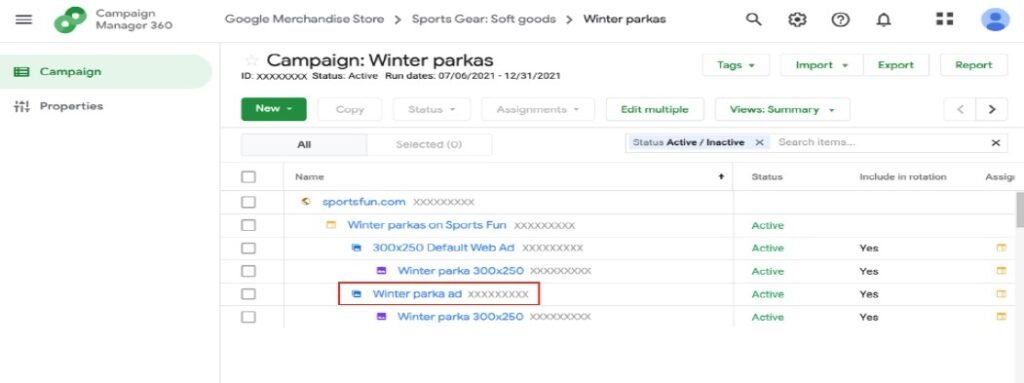
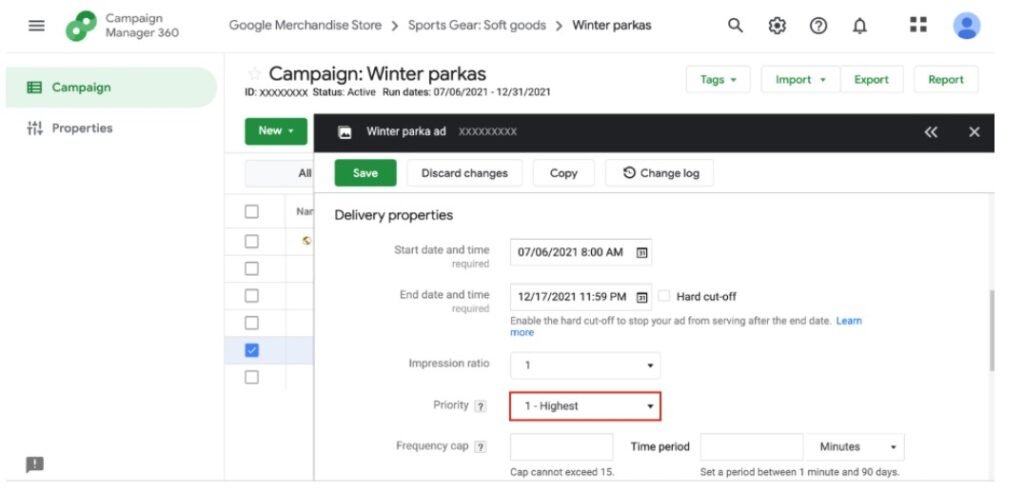
4. Under Delivery properties, set the priority. A higher priority makes sure this specific ad serves over a standard or default ad to your intended audience.
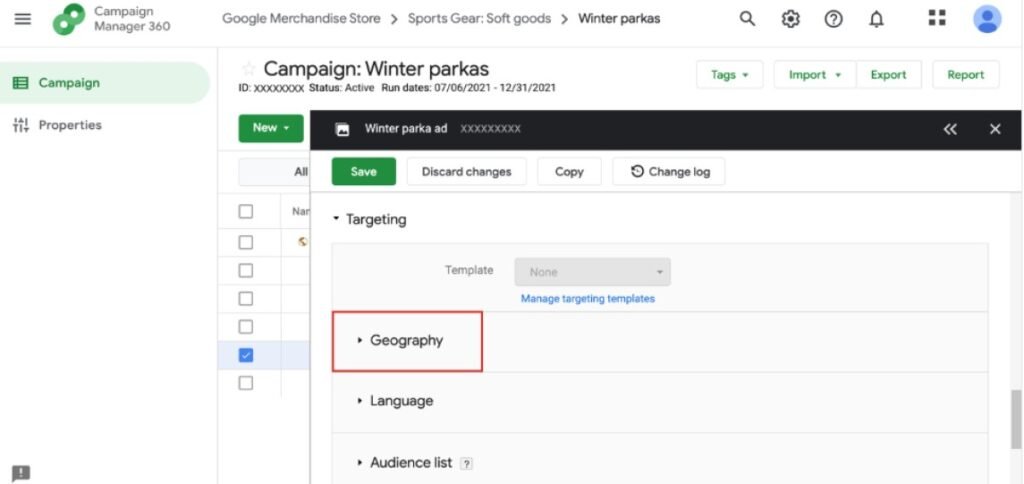
5. Scroll to Targeting, and select Geography to reveal location targeting options.
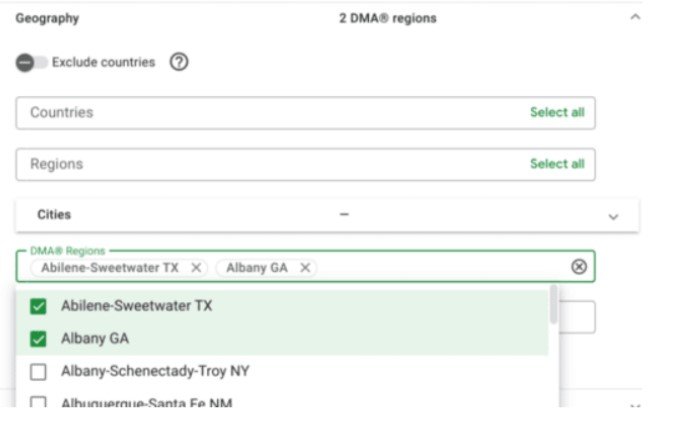
6. From the Regions field, choose the specific areas you want to reach. For Sports Gear, that might mean several northern U.S. states, or DMA regions like Abilene-Sweetwater TX and Albany GA.
7. Select Save.
Language, Technology, and Time and day targeting all live in that same Targeting section, right alongside Geography — the workflow for setting each is nearly identical: expand the section, choose your criteria, save.
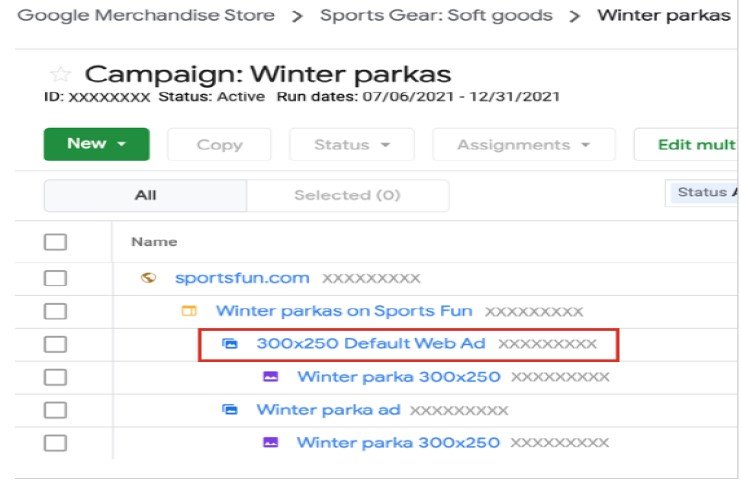
Default Ads
Default ads contain generic image creatives that serve if no other ad is available due to restrictions set in the standard ads. Think of default ads as your backup plan if no other creatives can be used. When you upload a standard image creative, Campaign Manager 360 automatically creates a default ad for you.
Note: You must assign default ads for each placement size in order to download tags for a placement.
Layering Criteria for Smarter Targeting
None of these five criteria are mutually exclusive. The strongest campaigns stack them.
Take the Tokyo store opening. A realistic setup might combine geographic targeting (Tokyo and surrounding prefectures), language targeting (Japanese-language creative), and time and day targeting (limited to the two weeks around the opening event) — all on the same ad.
Layer in an audience list — people who’ve previously visited the Sports Gear site from a Japan-based IP — and you’ve gone from “an ad running in Japan” to “an ad running in front of people who are geographically relevant, already somewhat interested, and seeing it during the exact window that matters.”
That’s the real value of CM360’s targeting layer: it’s not about picking one criterion, it’s about combining the ones that actually match your campaign’s goal.
Frequently Asked Questions
An audience list is a group of users defined by their behavior on your site, built using Floodlight tags — for example, everyone who viewed a product page but didn’t convert. You can then target or exclude that specific group in your campaigns.
Remarketing-style audience lists in CM360 are generated from Floodlight activity — the tags fire on your site, log the interaction, and CM360 groups matching users into a list you can target in future campaigns. See Google’s Campaign Manager 360 overview for how this fits into the platform as a whole.
Audience lists target people based on what they’ve done — their behavior on your site. Geographic targeting narrows by where they are. They solve different problems and are usually used together, not as alternatives to each other.
Yes. Geography, language, technology, time and day, and audience lists all live in the same Targeting section of an ad and can be combined freely to narrow your reach as precisely as the campaign needs.
What’s Next
Audience lists are the most powerful targeting option in CM360 — and the one most dependent on getting another piece of the platform right first: Floodlight.
In the next post, we’ll set up Floodlight tracking from scratch, so you can measure conversions and start building the audience lists this post referenced. Once those lists are live and driving traffic, you’ll want to know whether they’re actually working — which is exactly what our CM360 reporting guide covers.
Comments are closed.