Last updated: August 2026. Written from hands-on trafficking work in Campaign Manager 360 — not a rehash of Google’s help docs.
Open Campaign Manager 360 for the first time and you’ll hit a wall of jargon.
Advertisers. Campaigns. Placements. Ads. Creatives. Trafficking.
None of it is explained on the screen. You’re just expected to know.
This guide fixes that. We’ll cover what Campaign Manager 360 actually is, how its hierarchy fits together, and then walk through building a real campaign from scratch — the same six stages a trafficker runs through for every new client.
What Is Campaign Manager 360?
Campaign Manager 360 (CM360) is Google’s web-based ad management platform.
It creates, manages, traffics, and reports on digital ad campaigns at scale — across display, video, and more.
It’s part of Google Marketing Platform, the integrated stack that brings advertising and analytics data together so you can plan, buy, measure, and optimize from one place.
Think of CM360 as the ad server sitting underneath your campaigns. It decides which creative shows, tracks what happens after someone sees or clicks it, and reports on all of it — regardless of which platform actually bought the media.
That last part matters. CM360 gives you a neutral, platform-agnostic view of performance. You’re not stuck trusting one platform’s own numbers for its own ads. You see display, video, search, YouTube, Display & Video 360, and third-party site performance side by side, from a single dashboard.
The simplest CM360 Explanation below.
If you running Campaigns on multiple platform such as DV360, the trade desk, Google Ads or Amazon. You need to go on each of these platforms and upload creatives to serve ads. What if, in middle of the Campaign you have to change something on the creative, then you have go on each of these platform again and redo everything. This is very painful. Also, what if you need to check the performance, then you would need to go each of these platform and download report to check.
What if there is a tool in place where you upload all the creative at once, download the tags(it would contain creative details/instructions) and use these tags to update on every platform you are running Campaign. Everything will be controlled from your native platform but creative will be served from the tool. This way you can change anything on the creative and it will auto sync to all the platform. You can report data from this tool and don’t have to go all the platform you are running Campaigns to check. This is what CM360 does, it makes your creative serving, managing very smooth.
Preparing for Ad Ops Interview. Download Our Real CM360 Interview Questions & Answer PDF That Can Get You Hired.
Who Actually Uses CM360?
Two types of teams, generally.
Agencies and partners — companies that handle media buying and trafficking on behalf of advertisers.
Marketers — advertisers who manage their own media buying and trafficking in-house.
Either way, the platform works the same. What changes is who’s logging in and whose budget is on the line.
Why Advertisers Choose CM360
Four reasons come up constantly in onboarding conversations.
- Trusted, unified management. All your digital ad campaigns in one place — display, video, search, and more — with a neutral view of what’s actually working across channels.
- Comprehensive measurement. Impressions, clicks, conversions, and creative performance, with built-in attribution and reporting tools, all from a single dashboard.
- Streamlined workflows. Easier campaign setup, fewer manual tasks, real-time insights — which frees your team to focus on strategy instead of busywork.
- Stronger video handling. CM360 tracks video ads across YouTube, Display & Video 360, third-party sites, and connected TV, so you can see how your video performs everywhere, not just on one platform.
The platform also keeps evolving — Google publishes a running list of upcoming Campaign Manager 360 updates, worth a periodic check if you’re managing accounts long-term.
The Campaign Manager 360 Hierarchy, Explained
Here’s the structure, top to bottom. Every campaign you’ll ever build in CM360 follows this same shape.
- Advertiser — the business or brand the campaign belongs to.
- Campaign — a specific initiative under that advertiser, with its own dates, budget, and goal.
- Placement — where the ad runs, and under what terms.
- Ad — the instructions tying a creative to a placement.
- Creative — the actual asset the viewer sees.
The same top-down logic carries over into DV360, where a campaign sits above insertion orders and line items rather than placements. If you’re structuring an awareness buy, our walkthrough of DV360 video reach campaigns shows how that hierarchy looks once you add YouTube formats to it.
On paper that looks simple. In practice, the advertiser level is where most beginners get tripped up — because CM360 lets you nest advertisers inside each other.
Parent and Child Advertisers
Say your client, Sports Gear, sells two very different product lines: soft goods (apparel) and hard goods (equipment).
You want to see results separately for each line. But you also want one holistic view of Sports Gear as a whole.
The fix: set up “Sports Gear” as the parent advertiser, then create “Sports Gear: Soft goods” and “Sports Gear: Hard goods” as child advertisers underneath it.
Each child tracks its own campaigns independently. Roll them up, and you get the parent-level view. This is the single most useful structural decision you’ll make when onboarding a new client — get it right early, because restructuring it later is painful.
Campaign Essentials: Placements, Ads, and Creatives
These three terms get used interchangeably by beginners. They shouldn’t be.
| Term | What It Actually Is |
|---|---|
| Placement | A placeholder for the publisher’s ad slot. Includes compatibility, dimensions, and pricing. |
| Ad | The instructions for when, where, and how your campaign should appear — it connects a creative to a placement. |
| Creative | The actual asset: an HTML5 banner, GIF, JPG, or video file that advertises your business on the publisher’s site. |
CM360 supports creative formats across display, mobile, video, and app — including standard display, dynamic display, expandable display, interactive video, in-app, high-impact display, and masthead units.
How the Ad Server Actually Works
Ad servers exist to control the serving of display ads — rich media, video, GIFs, or a mix — while giving you the flexibility to adjust a live campaign.
Here’s the four-step flow behind every impression:
- A user visits a site that has ad space available.
- The advertiser’s ad is chosen to fill that space.
- The ad server supplies the best creative based on audience and contextual signals.
- The ad serves, and feeds performance data back to the ad server.
That feedback loop — serve, measure, adjust — is what makes CM360 an ad server rather than just a creative library. Google’s own trafficking overview walks through this process from the ad server’s side, if you want the deeper technical version.
How to Create Your First Campaign in CM360
Let’s build one. Say your agency just picked up a new client, Sports Gear, and you’re launching their winter parka campaign.
There are six stages. Here’s each one.
Stage 1: Create the Advertiser
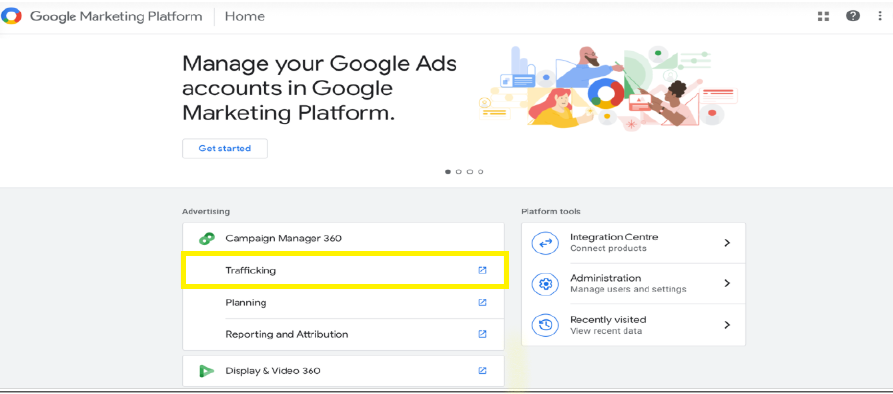
Sign in to Google Marketing Platform, and from Campaign Manager 360, select Trafficking.
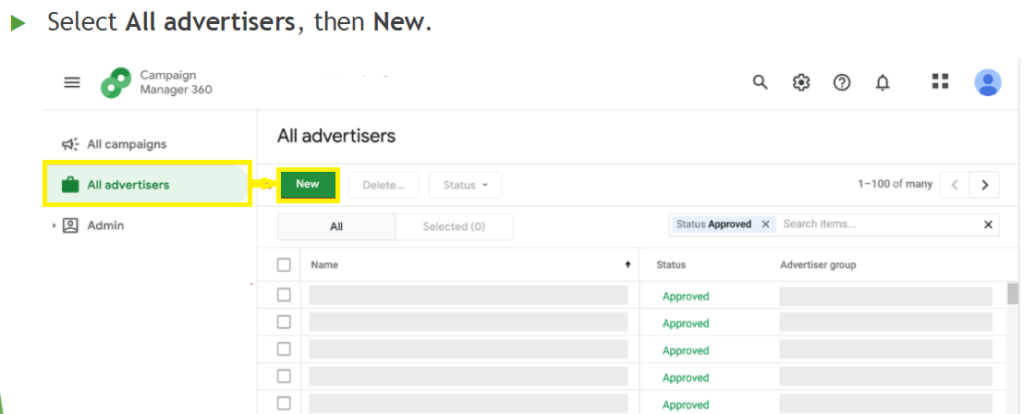
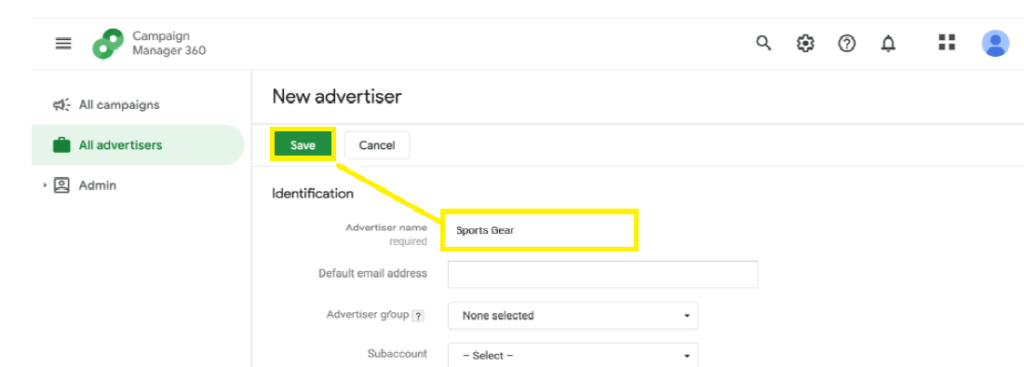
Go to All advertisers, then New. Under Identification, enter the advertiser name — “Sports Gear” — and select Save.
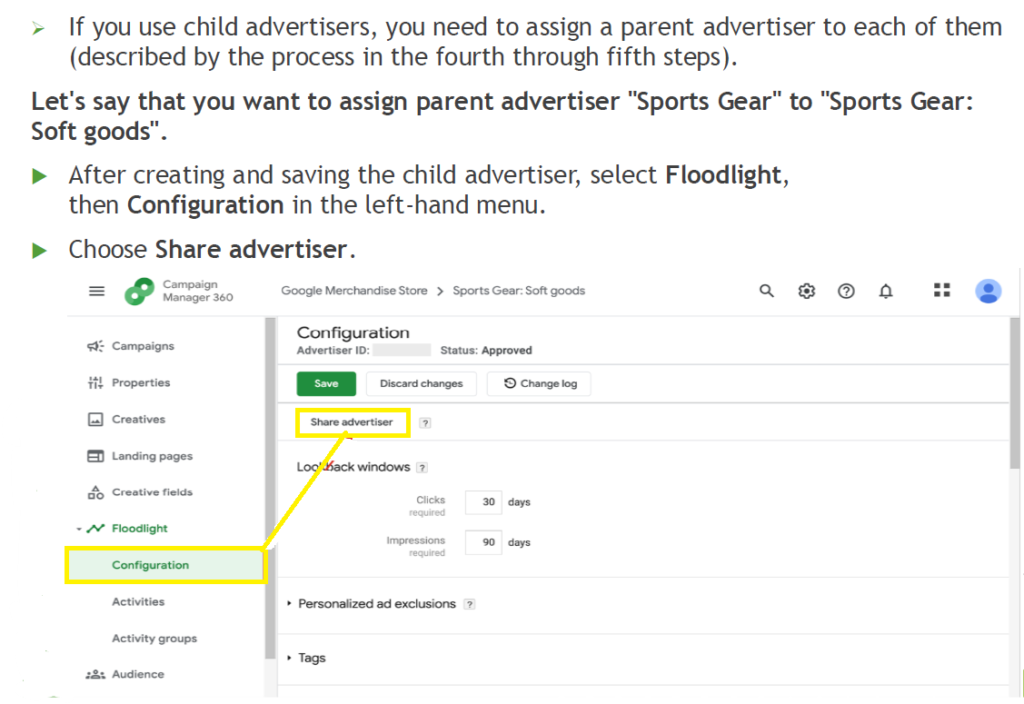
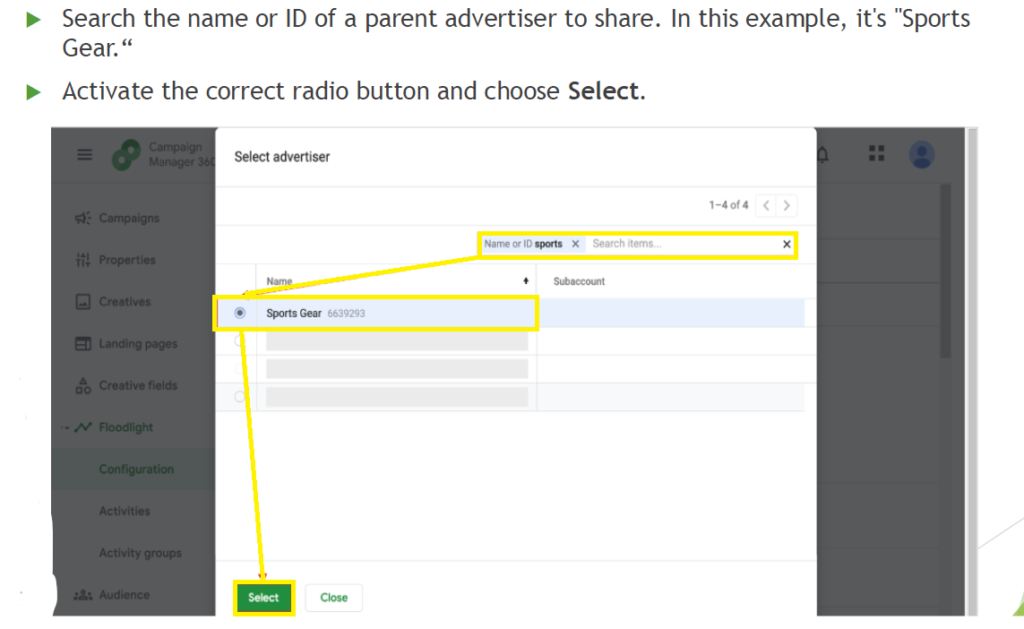
If you’re using child advertisers, create “Sports Gear: Soft goods” the same way, then link it to its parent: open the child advertiser, go to Floodlight → Configuration, select Share advertiser, search for “Sports Gear,” and select it.
Stage 2: Create the Campaign
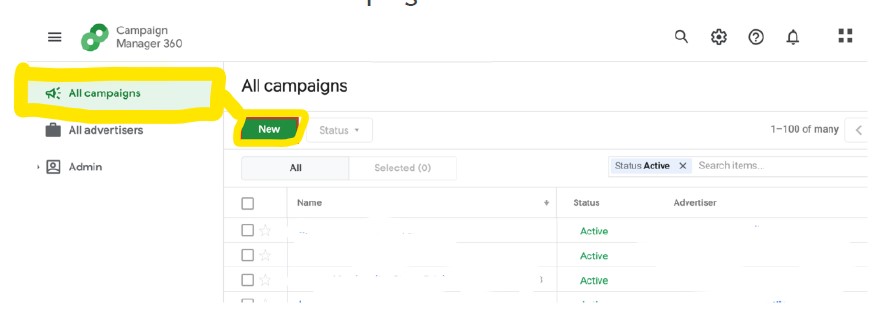
From All campaigns, select New.
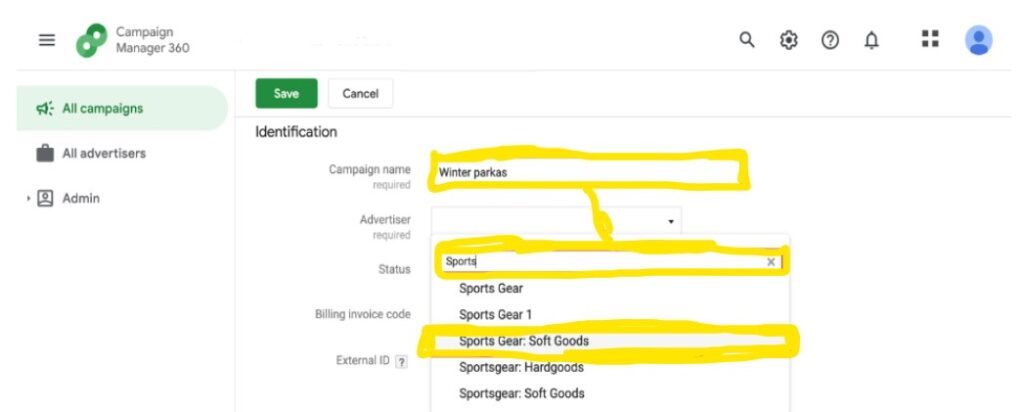
Under Identification, name the campaign — “Winter parkas” — and choose the correct advertiser from the dropdown (“Sports Gear: Soft goods”).
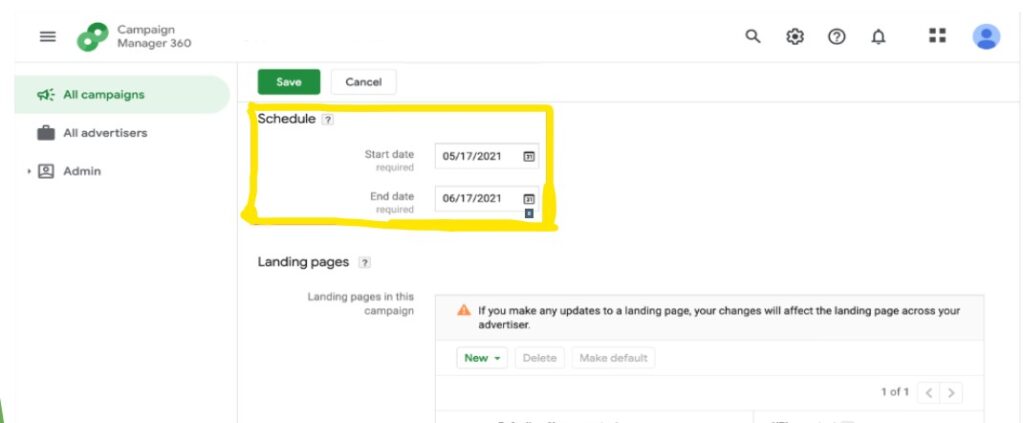
In the Schedule section, set your start and end dates.
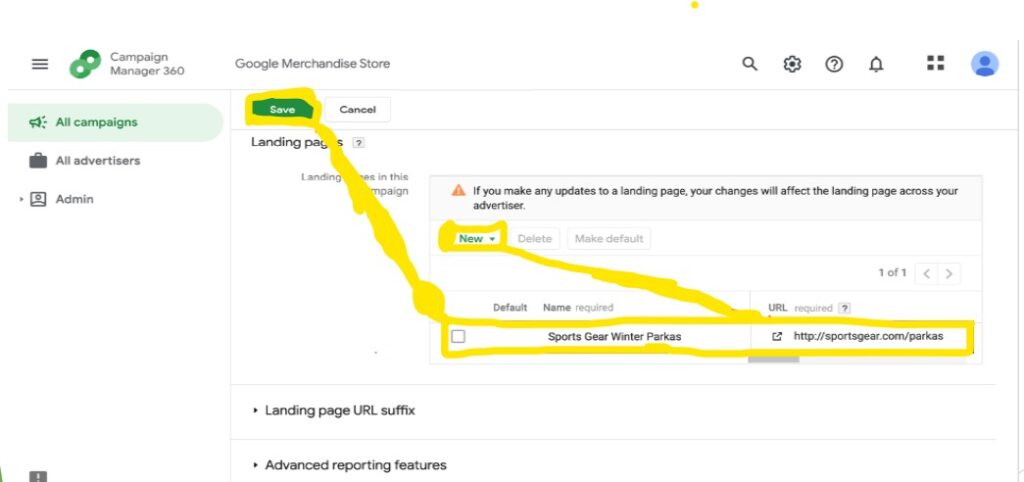
Under Landing pages, select New and enter the URL you want traffic to land on. Save.
Stage 3: Create the Placement
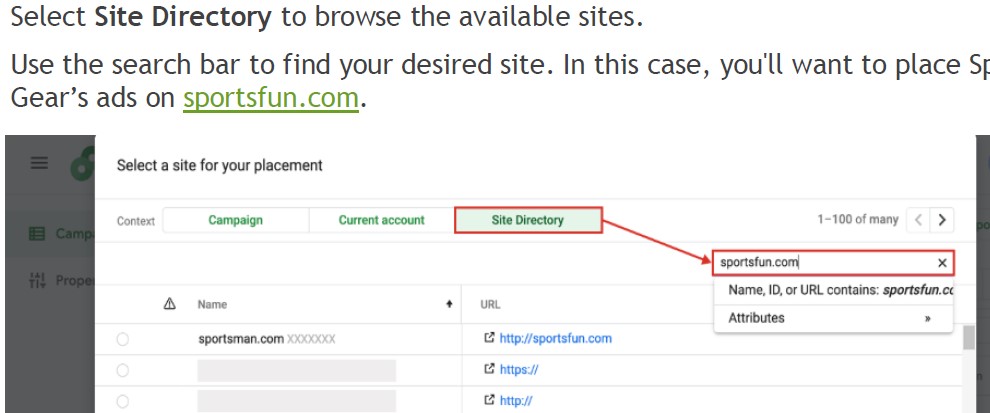
Say Sports Gear wants to advertise on an adventure news site, SportsFun.com.
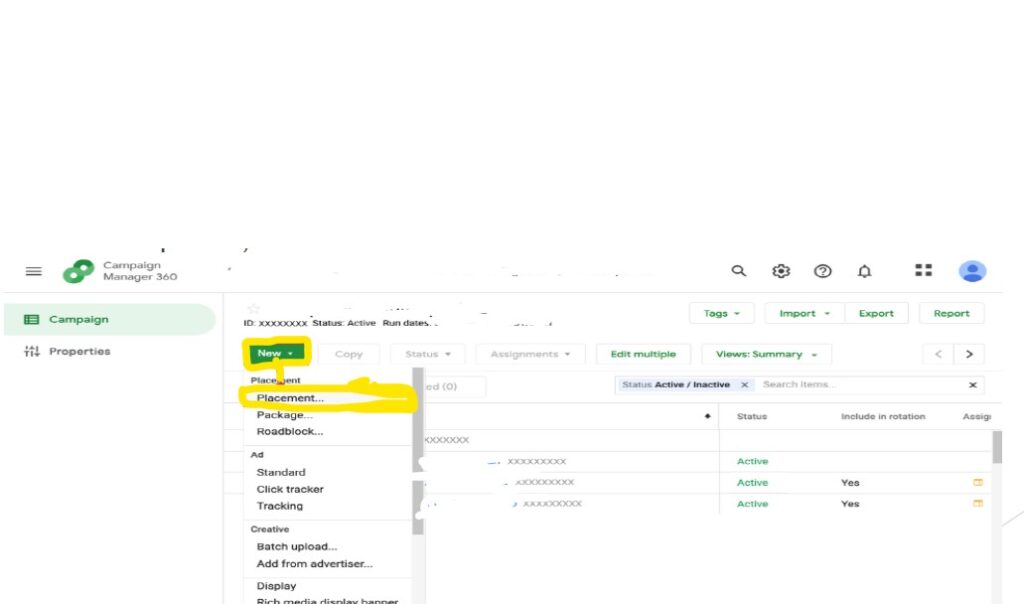
From your campaign, select New → Placement.
Choose Site Directory, search for the site, select it.
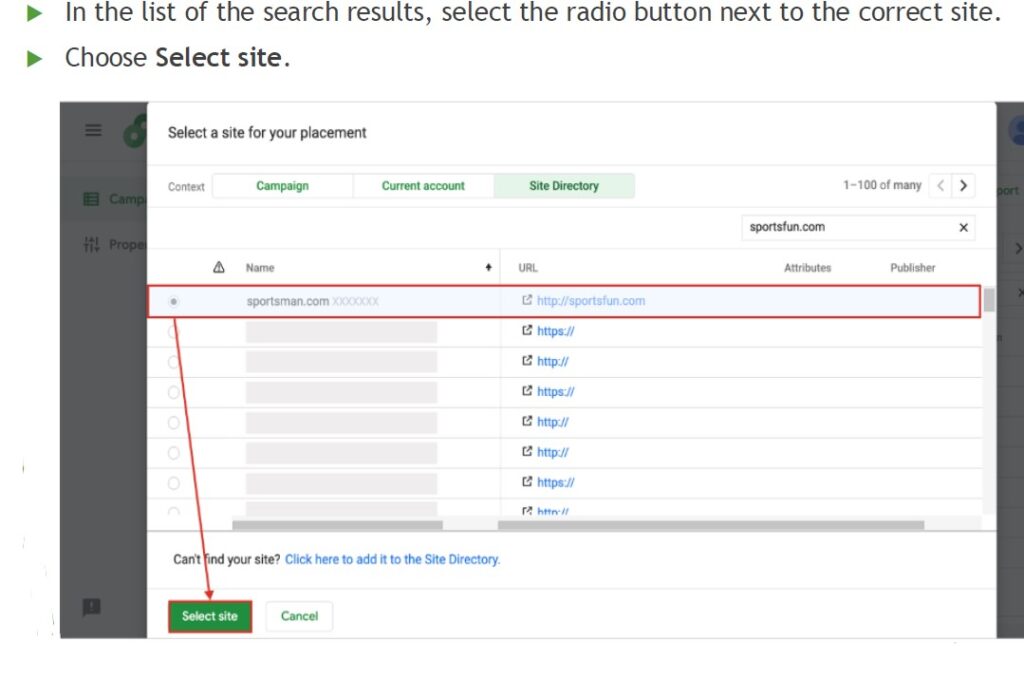
then select Select site.
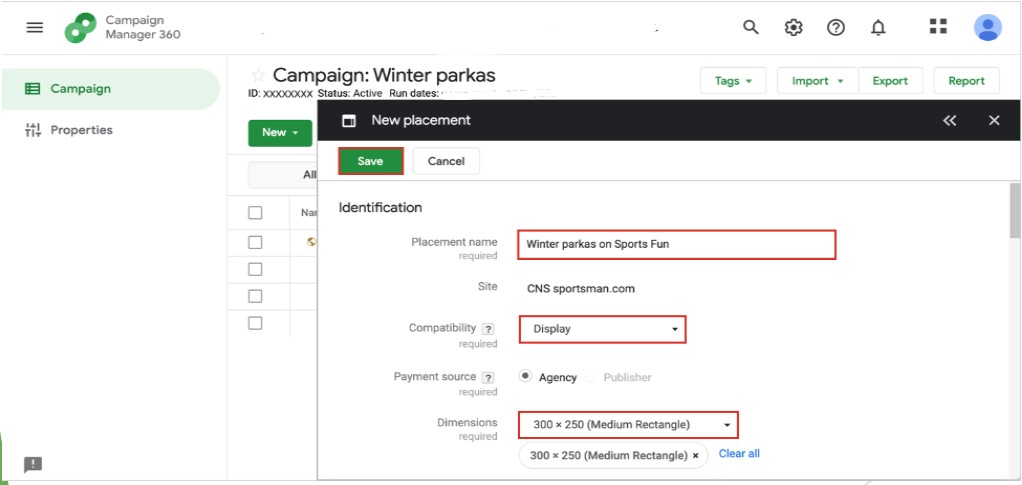
In the New placement window, name it clearly (“Winter parkas on Sports Fun”), set Compatibility to Display, choose your Dimensions, and save.
Stage 4: Upload Creatives
There are three main creative types: display (images and animated GIFs), rich media (interactive ads), and in-stream video.
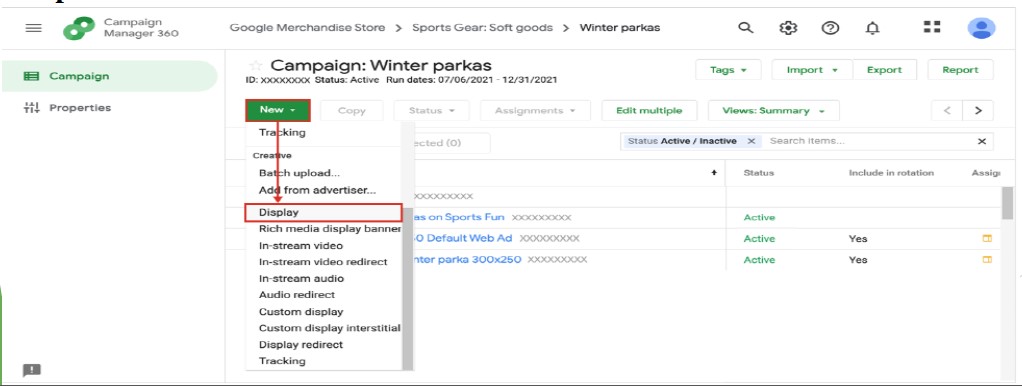
From your campaign, select New, scroll to Creative, and choose Display.
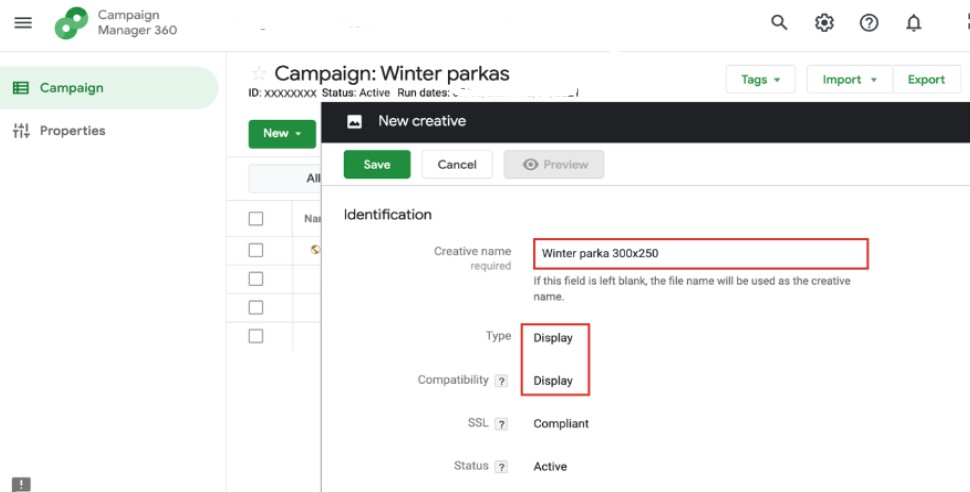
Name the creative — include its dimensions in the name (e.g., “Winter parka 300×250”) so you can identify it at a glance later.
Under Creative assets, select Add asset and upload the file.
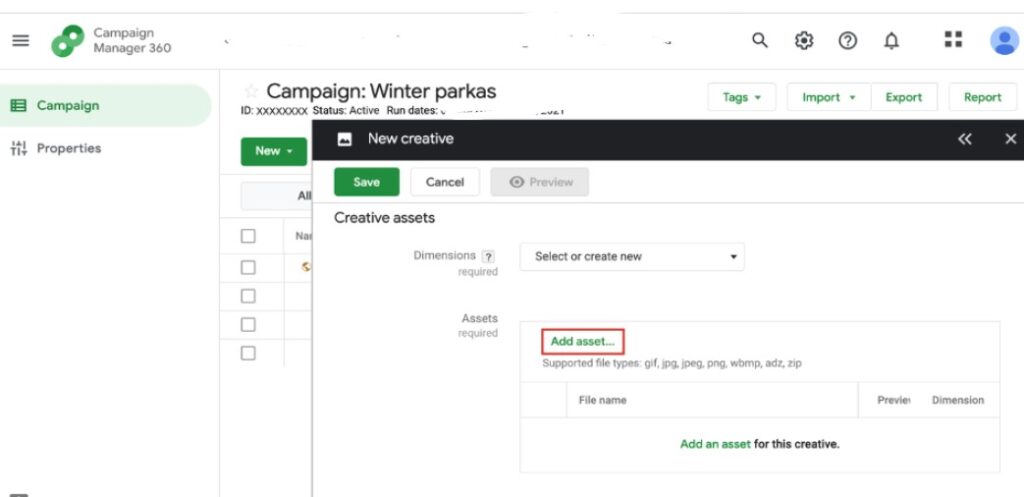
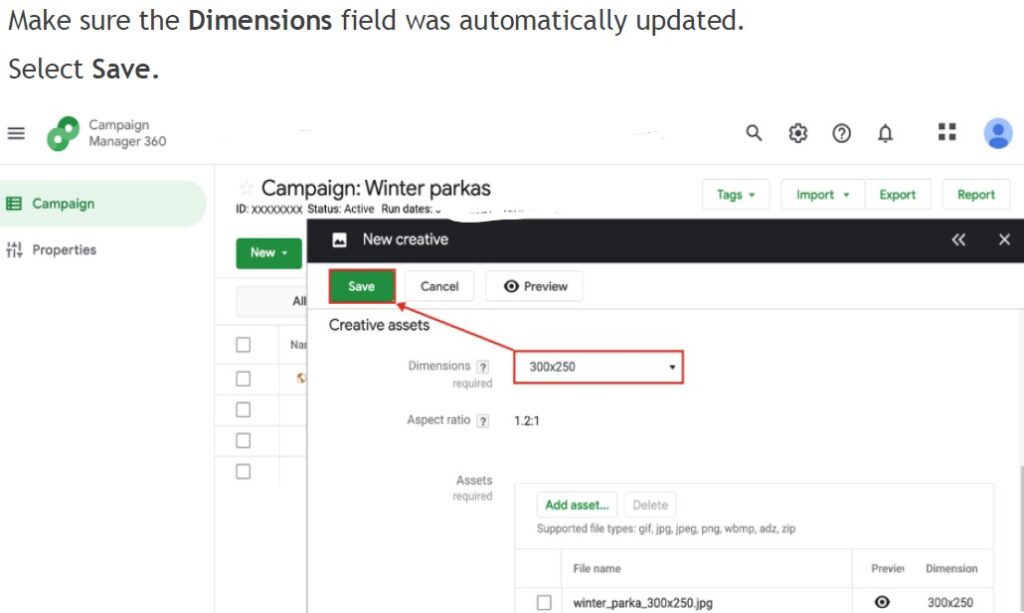
Once it uploads, CM360 auto-fills the Dimensions field. Save.
Stage 5: Create the Ad
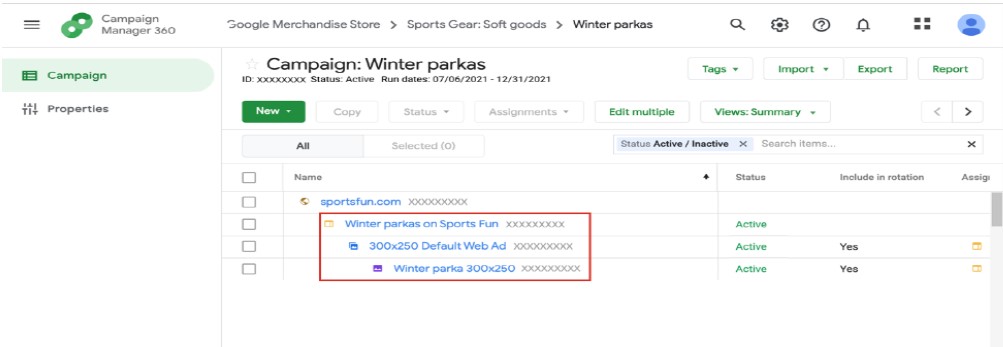
The ad is what unites the placement with the creative — it determines how and where the creative actually shows.
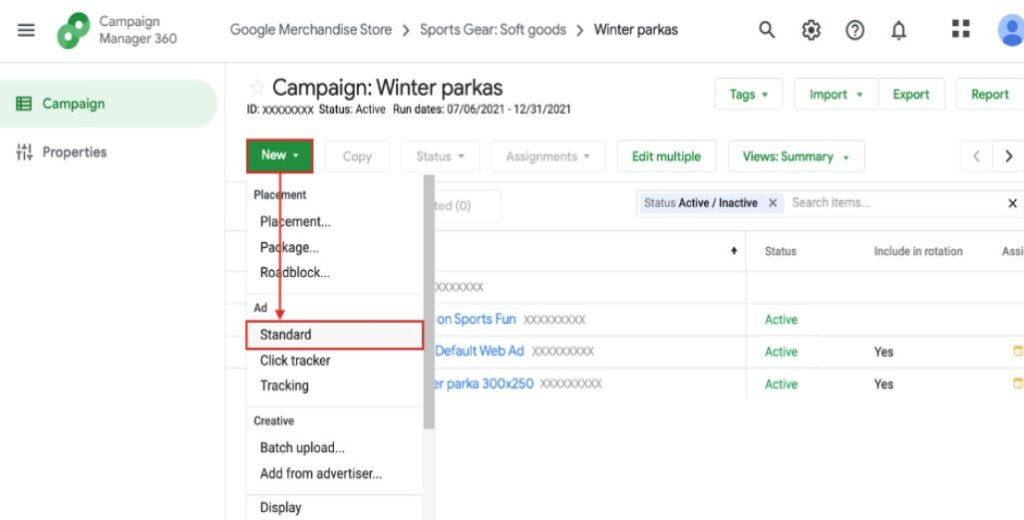
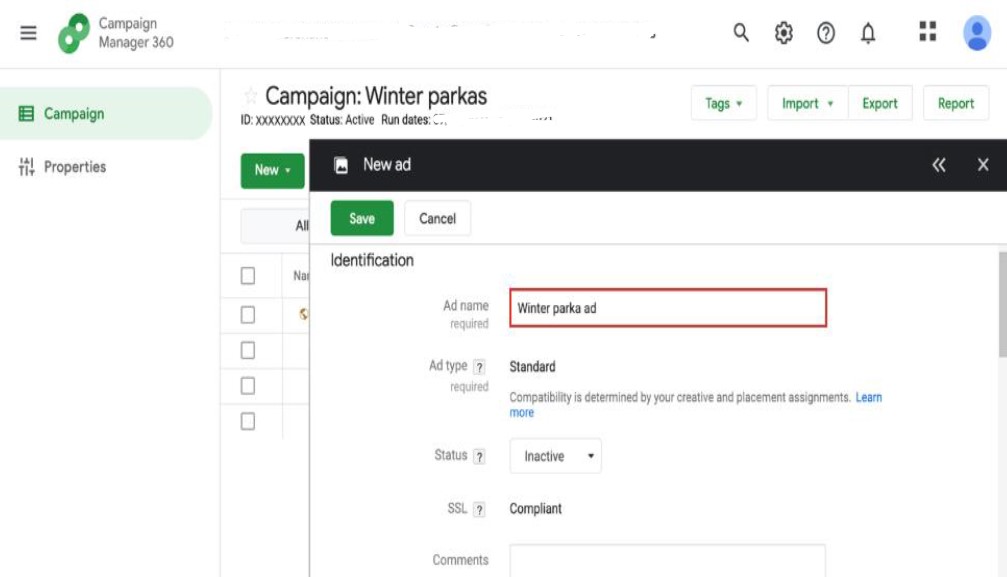
Select New → Standard under Ad. Give it a clear, unique name (“Winter parka ad”).
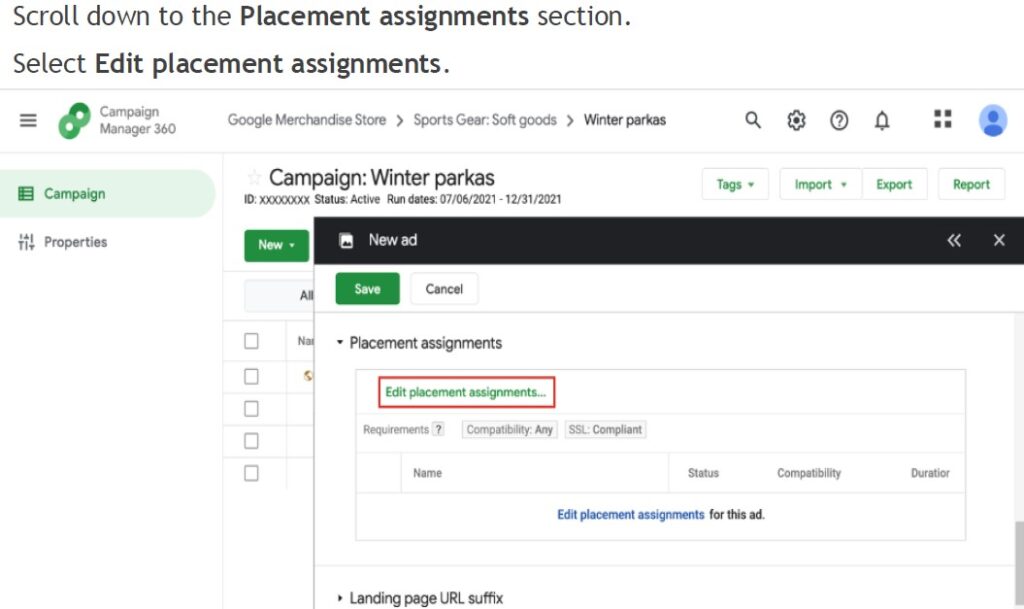
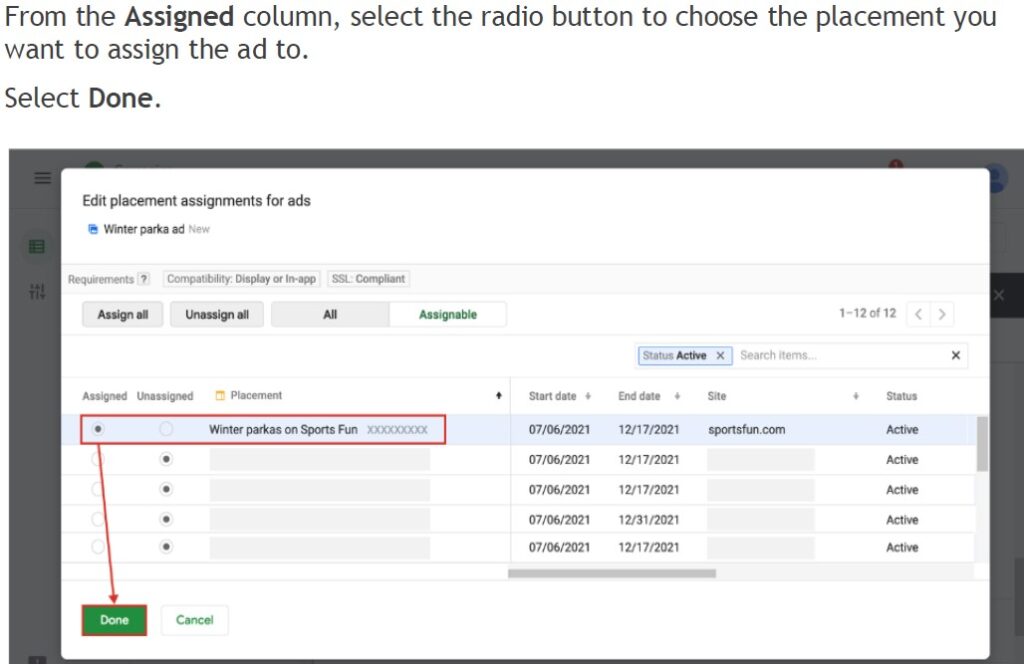
Scroll to Placement assignments, select Edit placement assignments, and assign the placement you just created.
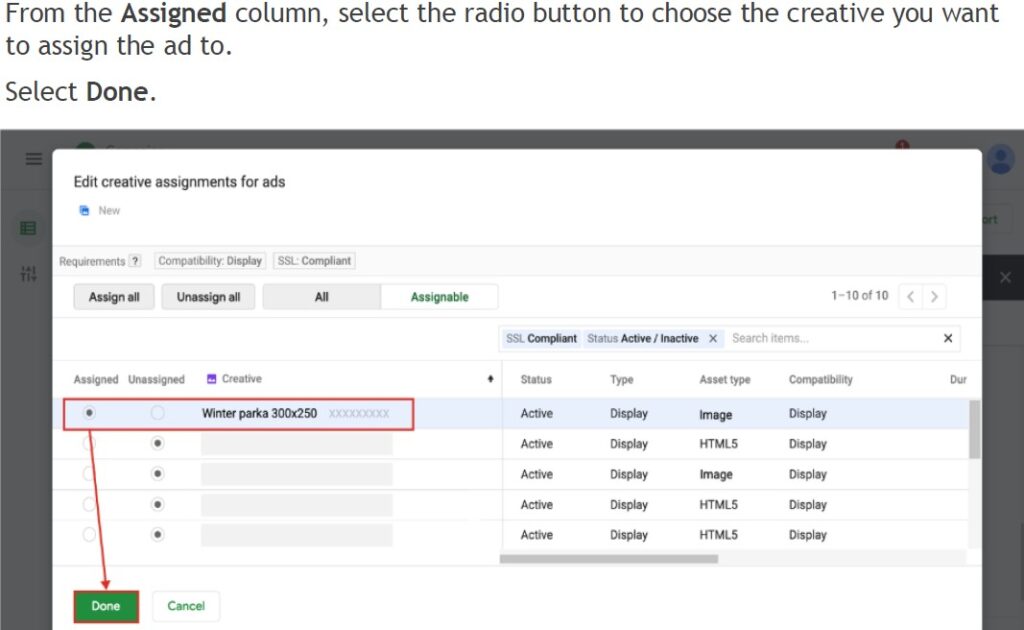
Then scroll to Creative assignments, select Edit creative assignments, and assign your uploaded creative. Save.
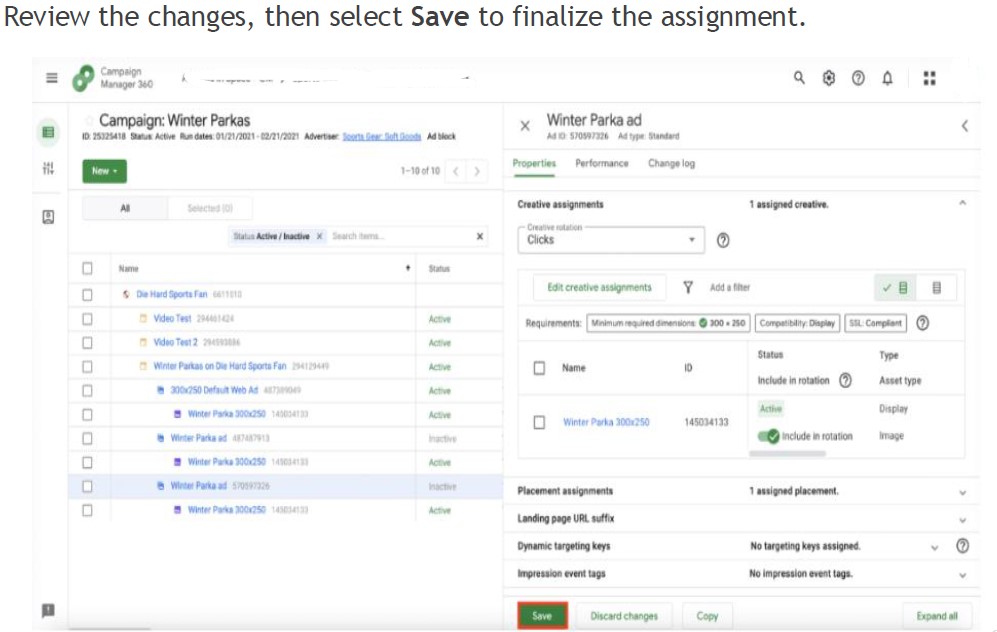
One detail worth knowing here: when you upload a standard image creative, CM360 automatically generates a default ad for you — a generic backup creative that serves if no other ad is eligible due to restrictions on your standard ads. You need one default ad per placement size to be able to download tags for that placement.
Stage 6: Download and Send Placement Tags
Verify every component of the campaign shows a status of Active.
From the top right of the campaign screen, select Tags → Download tags. Select the checkbox next to the placement you want to export, and select Download to get the file in Excel, text, or HTML format.
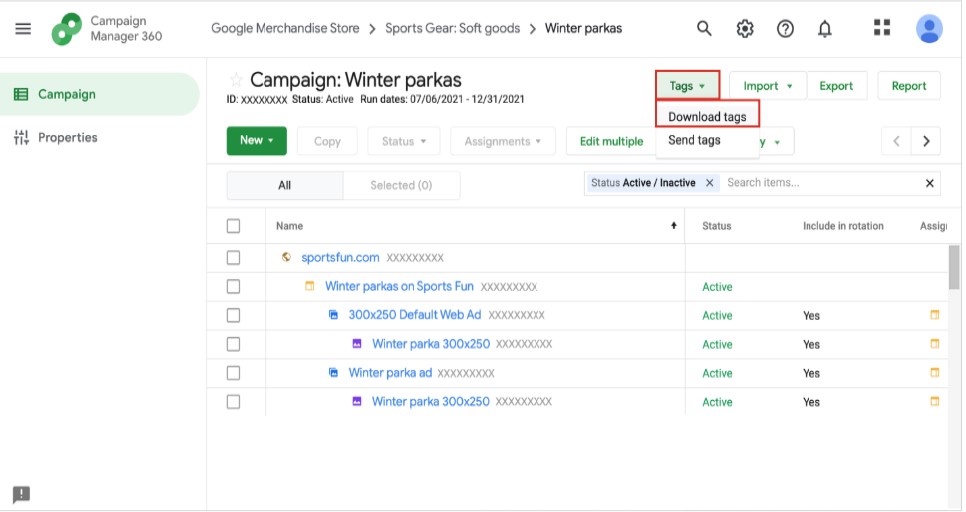
That file is what you send to the publisher — in this example, SportsFun.com — so their site knows where to serve your creatives.
And that’s a live campaign. Six stages, one advertiser hierarchy, done.
Frequently Asked Questions
CM360 is used to create, traffic, manage, and report on digital ad campaigns across display, video, and app — giving advertisers a single, platform-neutral view of performance instead of relying on each channel’s own reporting.
Display & Video 360 (DV360) is a demand-side platform for buying programmatic media. Campaign Manager 360 is the ad server and measurement layer that sits above it — it can track and report on ads bought through DV360, other DSPs, and even ads placed manually on publisher sites.
A parent advertiser is the top-level business entity. Child advertisers sit underneath it, letting you separate reporting for different product lines or divisions while still rolling everything up to one parent-level view.
A placement is a placeholder representing the publisher’s ad slot — including its dimensions, compatibility, and pricing terms. It’s where an ad, and its creative, will actually run.
No — you can launch a campaign without Floodlight. But you won’t be able to measure conversions from it. We cover exactly how to set up Floodlight tracking in the next post in this series.
What’s Next
You now have a live campaign structure: advertiser, campaign, placement, ad, and creative, all connected.
Next in this series: how to make sure that campaign actually reaches the right people, with CM360’s five audience targeting criteria — then how to measure whether any of it worked, with Floodlight and CM360 reporting.
Comments are closed.