Programmatic buying and brand awareness campaigns are a perfect match.
Most performance marketers agree with this. Do you?
Traffic and conversion campaigns have their place.
But awareness is the heart of programmatic media buying.
In 90% of the campaigns I have run, the goal was simple.
Get maximum visibility and own the upper funnel.
For awareness campaigns, CPM is king.
But your CPM is not fixed.
If you optimize your campaign well, you can save money.
Your budget then goes into real impact, not just DSP fees.
In this guide, we share proven tips for optimizing DV360 campaigns for CPM.
We focus on DV360, but most tips also work on other DSPs.
The best DV360 optimization strategies are simple.
Pick the right bid strategy for your goal.
Widen your targeting so you face less auction competition.
Set a relaxed frequency cap, like 4 to 6 per week.
Block only the most costly, low-value placements.
Refresh your creatives before people get bored of them.
Check pacing, viewability and attention data every few days.
Last updated: November 19, 2026
Table of contents:
- DV360 Display Campaign CPM Optimization
- DV360 Video Campaign CPM Optimization
- Bonus Tip
- 8 DV360 Optimization Strategies (Beyond CPM)
- DV360 Bidding Strategies: Which One to Use?
- 12 Quick DV360 Tips (Checklist)
- Frequently Asked Questions
One more thing before we start:
CPM optimization is different for Display and Video campaigns.
Both use the same DV360 auction.
But the “levers” you pull to lower cost are different for each format.
For display, you optimize for visibility and clicks.
For video, you optimize for engagement and watch time.
Here is the main difference between Display and Video campaigns in DV360:
| Feature | Display | Video |
|---|---|---|
| Main goal | Viewability and efficient reach | Completion rate and view-through rate |
| Where ads run | Above the fold (ATF) or below the fold (BTF) | In-stream (YouTube, TV) or out-stream (inside articles) |
| How you pay | vCPM: you pay only for viewable impressions | CPV on YouTube: you pay when users watch 30 seconds or till the end |
| Device cost | Mobile web and apps usually have the lowest CPM | CTV has the highest CPM but the best completion rates |
| Sign of ad fatigue | CTR starts to drop | Video completion rate (VCR) starts to drop |
Let’s start!
How to Optimize DV360 Campaigns for CPM
1. CPM Optimization for DV360 Display Campaigns
- Expand your inventory:
This tip works for both Display and Video campaigns.
Many traders miss it, so I have put it first.
Tight targeting means more advertisers fight for the same impressions.
More competition means a higher price, so your CPM goes up.
A safe fix is to add more audience lists.
Find similar audiences to your current ones and add them.
This gives you more inventory and less competition.
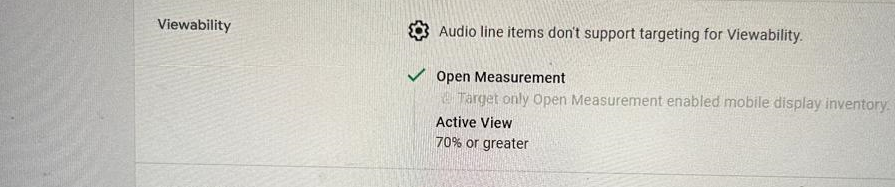
You can also lower viewability targeting a little.
If it is set at 80%, move it to 70%.
If it is at 70%, move it to 60%.
You can also add a line item with only your best creative and audience.

- Relax your frequency cap:
Frequency cap is how many times one user sees your ad.
A tight cap, like 1 or 2 per week, raises competition.
It tells DV360 to bid only on new, unique users.
Almost every advertiser wants that first “fresh” impression.
That is why the first impression costs the most.
Now, try a cap of 5 or 6 per week instead.
You tell DV360 it is okay to show ads to the same user again.
Demand for the 4th or 5th view is lower than for the first.
So your CPM drops. - Turn on auto budget allocation:
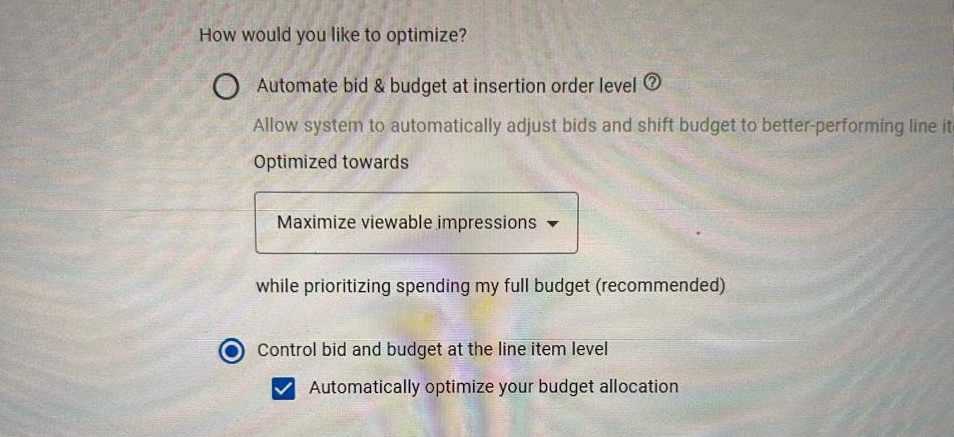
Use auto budget allocation if your IO-level KPI is CPM.
Most traders overlook this simple setting.
DV360 then gives more budget to line items with a lower CPM.
It gives less budget to line items with a higher CPM.
For this to work well:
1. You need more than one line item in the IO.
2. You must set CPM as the KPI at the IO level.

- Pick the right ad format:
Standard banners like 300×250 and 728×90 are cheap and have high volume.
High-impact formats like Interstitials or Skins cost more.
Their CPM can be two or three times higher. - Exclude expensive inventory:
Download a report with placement URLs, device, browser, OS and region.
Look for items where CPM is higher than your booked CPM.
Focus on items with both high impressions and high CPM.
Block some of them, not all at once.
If you block too much, pacing will drop.
Less inventory also means more competition, so CPM can rise again. - Use the CTR–CPM link:
In many auctions, a high CTR tells the system your ad is relevant.
Relevant ads may then win impressions at a lower price.
So a better creative can also lower your CPM. - Use “Maximize viewable impressions”:
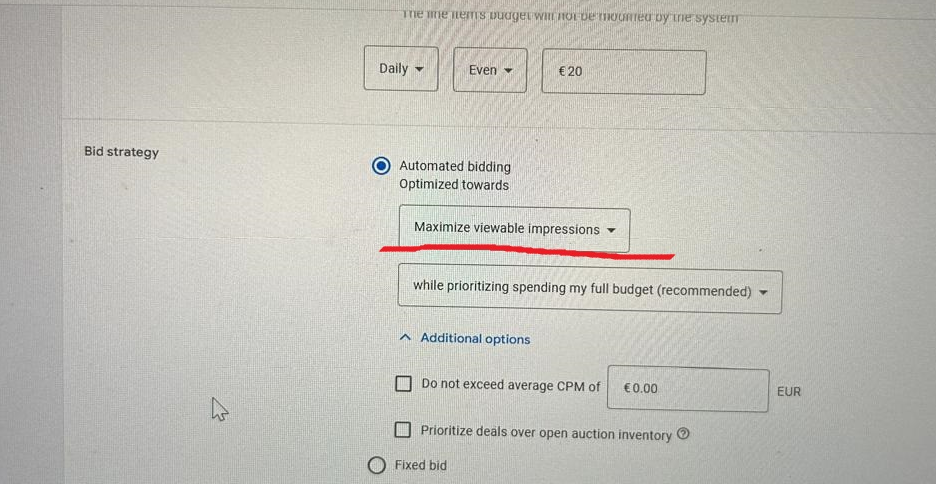
For CPM campaigns, pick the “Maximize viewable impressions” bid strategy.
Then tick “Do not exceed average CPM of” and enter your target CPM.
DV360 will focus on viewable placements within your target CPM.
This way, you do not waste money on low-quality inventory.

2. CPM Optimization for DV360 Video Campaigns
- Improve the first 3 to 5 seconds:
For video, the DV360 algorithm watches your view rate.
If people skip your video in the first few seconds, view rate falls.
The algorithm then bids higher to get more views.
This pushes your CPM up.
How do you know if people skip early?
Download a video completion report.
Compare your start count with the 25% and 50% completion numbers.
A big drop means you should fix the video intro. - Choose the video format wisely:
Non-skippable ads cost more because users must watch them fully.
Skippable ads cost less because users can skip them.
Standard web video is usually cheaper than YouTube.
CTV is usually more expensive than YouTube.
So pick placements based on your goal and budget. - Use the “Maximize completed views” bid strategy:
It tells DV360 to focus on users who actually watch your ad.
Without it, you may buy views that play in a background tab.
Those views waste your budget. - Run shorter videos:
Shorter videos get higher completion rates.
This tells the algorithm that people are engaged.
Better engagement helps bring your CPM down. - Study your data:
Download a report with placement URL, device, OS, browser and region.
Find items where the actual CPM is much higher than your booked CPM.
Look closely at items with both high impressions and high CPM. - Make careful exclusions:
Do not block everything at once.
Start with the most costly, poor-performing placements.
This way, your campaign keeps its reach. - Protect your pacing:
Blocking too much leaves you with too little inventory.
Less inventory means more competition in each auction.
That pushes your CPM even higher.
Bonus Tip for CPM Optimization
- A/B testing and bid shading:
Your CPM depends a lot on your insertion order’s past data.
DV360 uses “bid shading” to study your past winning bids.
It then predicts the lowest price needed to win an impression.
If you often win at low prices, DV360 keeps your bids efficient.
So run an A/B test on DV360.
Also run a brand lift study.
Find which creative or audience works best.
Then run more of those to improve your CPM.
Note:
Bid shading is made for first-price auctions.
In a first-price auction, you pay exactly what you bid.
Without bid shading, you might bid $20 for a slot worth $10.
DV360 uses past data to “shade” that $20 bid closer to market value.
This protects your margins.
8 DV360 Optimization Strategies (Beyond CPM)
Lowering CPM is only one part of DV360 optimization.
A good trader also checks pacing, reach, quality and results.
Here are 8 simple DV360 optimization strategies we use on live campaigns.
1. Match the bid strategy to your goal
Every campaign goal needs a different bid strategy.
For awareness, use “Maximize viewable impressions”.
For video, use a completed views strategy.
For sales or leads, use conversion-based bidding.
You can also control cost with “Do not exceed average CPM”.
Read Google’s guide on automated bid strategies for full details.
2. Fix pacing before anything else
If your campaign under-spends, other changes will not help much.
Check pacing on day 2 or 3 of the campaign.
If pacing is slow, widen targeting or raise the bid a little.
If pacing is too fast, set a daily budget cap at the IO level.
Read our full DV360 pacing optimization guide.
3. Set the right frequency cap
Frequency cap means how many times one person sees your ad.
A very tight cap pushes your CPM up.
A very loose cap annoys users and wastes budget.
For most awareness campaigns, 4 to 6 per week works well.
Check your reach report after week one and adjust.
4. Use deals for quality inventory
Open auction is cheap, but site quality can be mixed.
Private deals (PMPs) give you better sites at a fixed or floor price.
Use deals for premium placements and open auction for scale.
Compare CPM and viewability of both every week.
5. Refresh your creatives often
People stop noticing an ad after seeing it many times.
This is called creative fatigue.
Watch for a drop in CTR for display ads.
For video, watch for a drop in completion rate.
When it drops, add a new creative or a new ad size.
Keep at least 2 to 3 creatives running in each line item.
6. Clean up your inventory
Some sites eat your budget but give poor results.
Pull a placement report every week.
Exclude sites with low viewability, very high CPM, or zero clicks.
Turn on brand safety settings to avoid unsafe content.
Do not block too much at once, or pacing will drop.
7. Try attention optimization in DV360
Viewability tells you if an ad could be seen.
Attention tells you if people actually looked at it.
In July 2026, DV360 added Adelaide Attention Units (AU) to custom bidding.
This lets DV360 bid more on placements that get real attention.
It also bids less on placements people usually ignore.
Ask your Google rep if this is open for your account.
Learn more about custom bidding in DV360.
8. Test first, then scale what works
Do not guess which audience or creative is best.
Use DV360 Experiments to run a fair A/B test.
Test one thing at a time, for at least 2 weeks.
Move budget to the winner once results are clear.
See our step-by-step A/B test on DV360 guide.
DV360 Bidding Strategies: Which One to Use?
Use this simple table to pick the right bid strategy.
| Your goal | Bid strategy | Good to know |
|---|---|---|
| Brand awareness (CPM) | Maximize viewable impressions | Add “Do not exceed average CPM” to control cost. |
| Video views | Maximize completed views | Shorter videos usually get a lower CPM. |
| Website traffic | Maximize clicks (CPC) | Watch out for low-quality or accidental clicks. |
| Sales or leads | Maximize conversions / target CPA | Needs Floodlight data. See our DV360 CPA guide. |
| Your own goal (like attention) | Custom bidding | You score each impression with your own rules. |
| Full manual control | Fixed bid | No machine learning help, so check it often. |
12 Quick DV360 Tips (Checklist)
Save this list and check it before every campaign launch.
- Name campaigns, IOs and line items in one clear format.
- Set your main KPI at the insertion order (IO) level.
- Run at least 2 line items so budget can move to the winner.
- Test your Floodlight tags before the campaign goes live.
- Start with wider targeting, then narrow it down with data.
- Keep viewability targeting at 60% to 70%, not higher.
- Keep frequency at 4 to 6 per week for awareness.
- Add brand safety and fraud filters on every line item.
- Check pacing on day 2 or 3, not at the end.
- Pull a placement report weekly and exclude poor sites.
- Refresh creatives when CTR or completion rate starts to fall.
- Keep a change log so you know what moved your results.
Want to test your DV360 knowledge? Try our free DV360 mock test.
Preparing for a job interview? Read our DV360 interview questions and answers ebook.
Frequently Asked Questions
- How does expanding targeting help lower CPM in DV360?
Tight targeting makes many advertisers compete for the same impressions.
This raises your CPM.
Adding more audiences lowers competition and cost. - Why should I avoid very tight frequency capping for CPM optimization?
A cap like 1 per week makes DV360 bid only on first impressions.
First impressions cost the most.
A cap of 5 or 6 per week lets you buy cheaper repeat views. - What is the best bidding strategy for a DV360 Display CPM campaign?
Use “Maximize viewable impressions”.
Then add “Do not exceed average CPM” with your target CPM. - How do the first 5 seconds of a video affect my CPM?
If people skip early, your view rate falls.
DV360 then bids higher to get views, which raises CPM.
A stronger intro keeps your CPM lower. - Should I block all high-CPM inventory to optimize my campaign?
No. Block only the worst placements, a few at a time.
Blocking too much creates scarcity and raises CPM. - What are the best DV360 optimization strategies?
Match your bid strategy to your goal.
Fix pacing first and use a relaxed frequency cap.
Clean up poor placements and refresh creatives often.
Test changes with DV360 Experiments. - What is attention optimization in DV360?
It means bidding more on placements where people actually look at your ad.
In July 2026, DV360 added Adelaide Attention Units to custom bidding for this. - How often should I optimize a DV360 campaign?
Check pacing daily in the first week.
After that, review placements, creatives and frequency once a week.
Avoid many changes at once, as the algorithm needs time to learn.
Written By
Chetna leads content creation at Datametrik, turning complex programmatic workflows, ad operations, paid media strategies, and SEO frameworks into practical, step-by-step guides.
Technically Reviewed & Verified By
Every Datametrik guide is audited for live platform accuracy, bidding mechanics, and tracking setup by our technical editors with programmatic media buying and Ad Ops experience across WPP, Cognizant, and Dentsu.
Comments are closed.