Quick answer
First user DV360 campaign name is a GA4 dimension.
It shows the DV360 campaign that first brought a user.
GA4 saves it on that user’s very first visit.
After that, it never changes for that user.
It only fills when GA4 is linked to DV360.
Users who came first from other channels show (not set).
That is normal, not an error.
In this guide
2. First user vs session vs event
4. Step-by-step: link DV360 to GA4
6. Every DV360, CM360 and SA360 dimension
You opened GA4 and saw a strange dimension.
It says “First user DV360 campaign name”.
Or your report is full of “(not set)” rows.
This guide explains it in plain English.
You will learn what it means and how to set it up.
You will also learn how to fix “(not set)”.
Every step has a picture.
What does “First user DV360 campaign name” mean?
GA4 stores traffic data at three levels, called scopes.
“First user” means the value belongs to the person.
GA4 sets it on their first visit to your site.
It stays the same on every later visit.
“DV360 campaign name” is the campaign name inside Display & Video 360.
Put together, it answers one simple question:
“Which DV360 campaign brought this person to us first?”
Google’s own definition says the same thing.
It is “the DV360 Campaign Name that originally acquired the user”.
A simple example
Priya sees your YouTube ad, bought through DV360.
She clicks it and lands on your website.
GA4 records her first user DV360 campaign name.
The value is IN_Q4_Prospecting_YT.
Next week, she comes back from a Google search.
Her first user value is still IN_Q4_Prospecting_YT.
That is the whole idea: the first touch is kept forever.
First user vs session vs event: what is the difference?
GA4 has three versions of the DV360 campaign name.
They look similar but answer different questions.
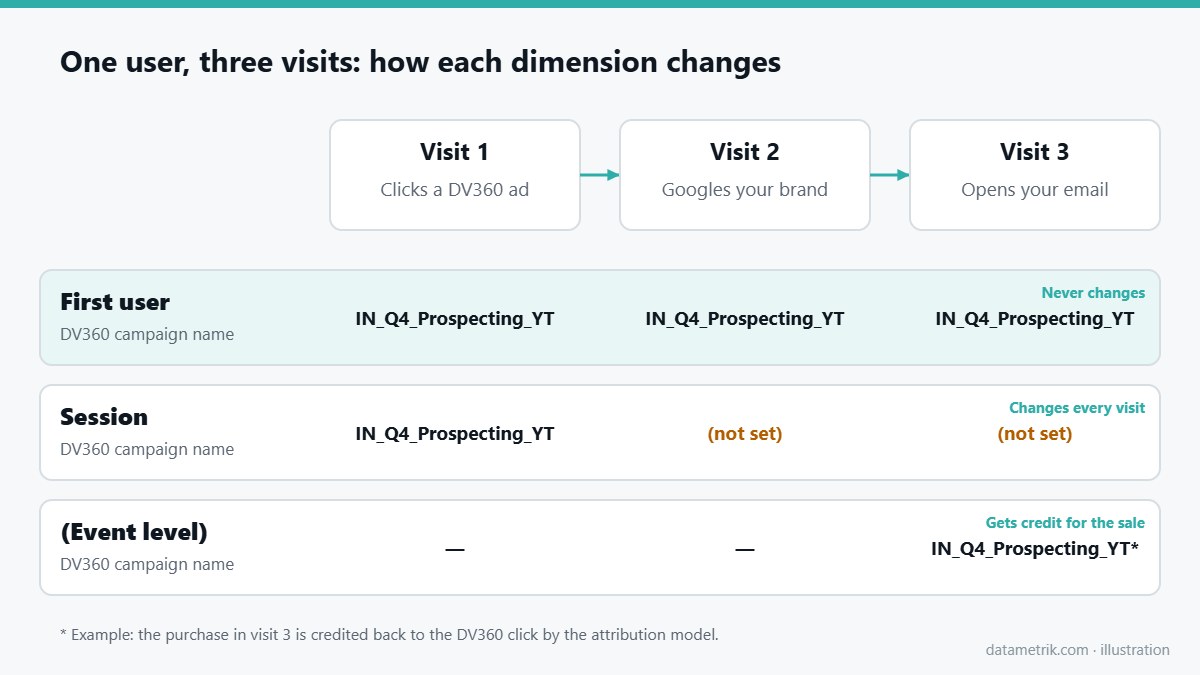
| Dimension | Scope | What it tells you | Where you see it |
|---|---|---|---|
| First user DV360 campaign name | User | The campaign that first brought the user | User acquisition report, Explorations |
| Session DV360 campaign name | Session | The campaign that started this visit | Traffic acquisition, Display & Video 360 report |
| DV360 campaign name | Event | The campaign credited with a key event | Advertising reports, Explorations |
Use first user to judge how many new people DV360 brings.
Use session to judge visits and engagement.
Use the event version to judge key events and revenue.
Never mix them in one comparison. The numbers will not match.
How does GA4 fill this dimension?
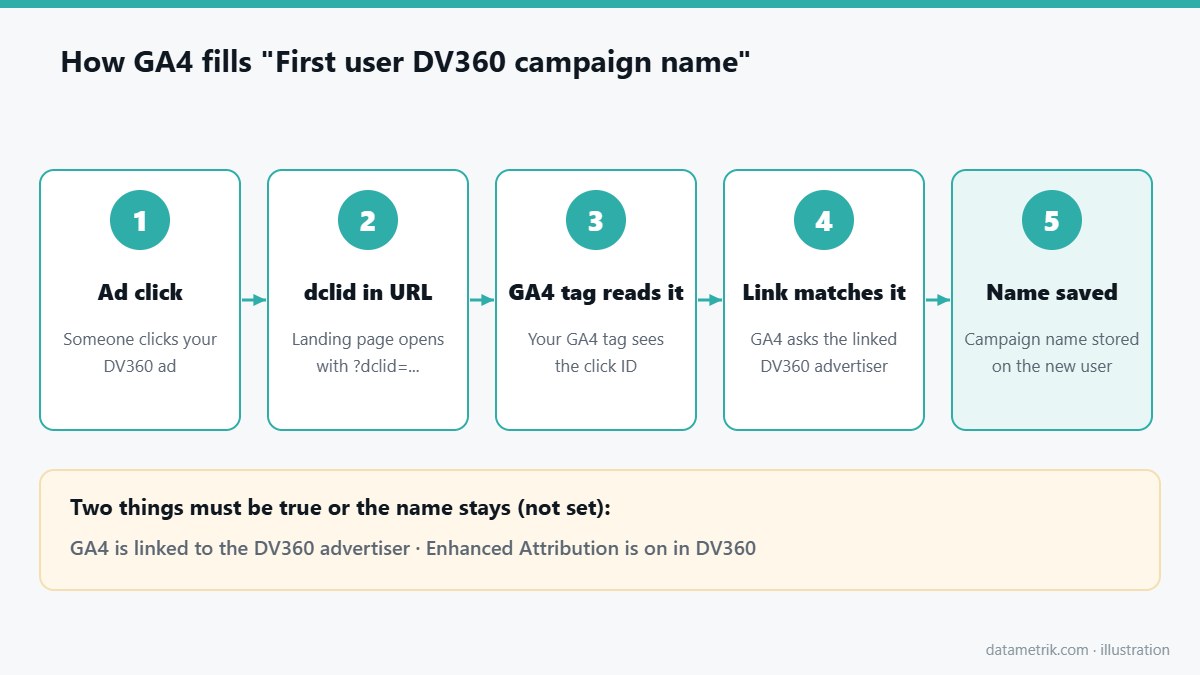
When someone clicks a DV360 ad, a click ID is added.
It is called dclid and sits in the page URL.
Your GA4 tag reads this click ID.
GA4 then matches it with the linked DV360 advertiser.
It gets the campaign, insertion order and line item names.
Google calls this auto-tagging.
You do not add anything to your URLs by hand.
Two rules to remember
No link between GA4 and DV360 means no DV360 names.
Data from before the link is not filled in later.
Before you start: what you need
- A GA4 property with the tag on every page.
- Editor role (or higher) on that GA4 property.
- Admin role on the DV360 advertiser, or someone who has it.
- About 10 minutes.
Step-by-step: link DV360 to GA4
Step 1: Open “Display & Video 360 links” in GA4
In GA4, click Admin at the bottom left.
Find the Product links section.
Click Display & Video 360 links.
Then click the blue Link button.
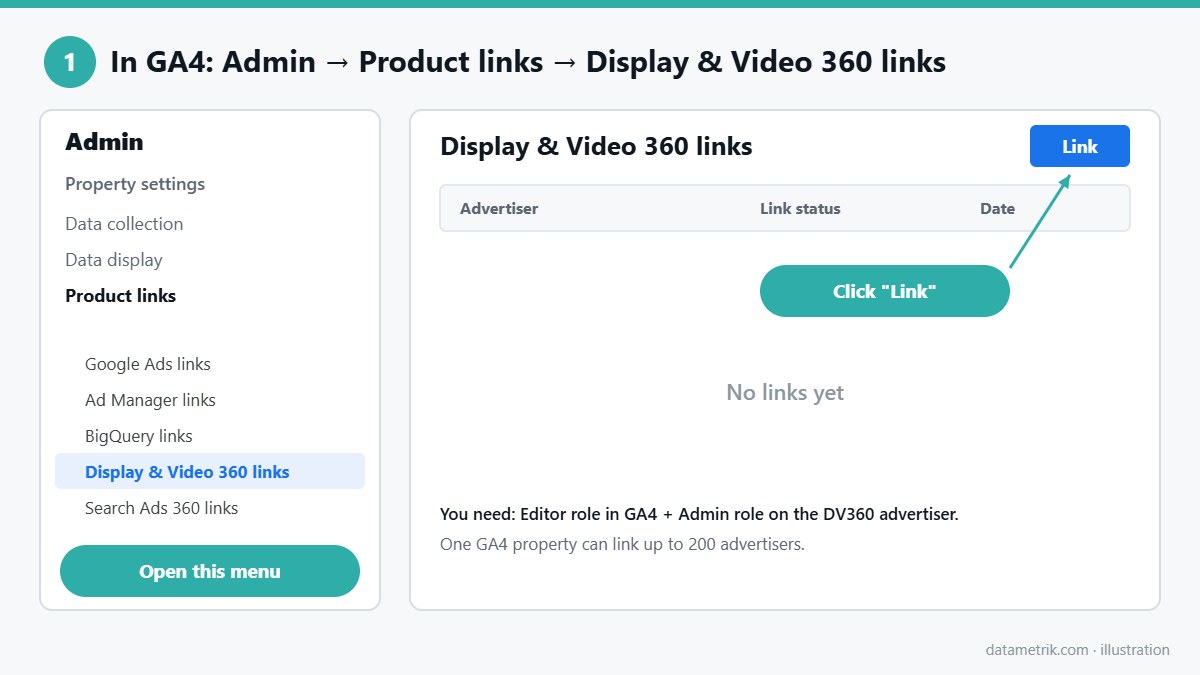
One GA4 property can link up to 200 DV360 advertisers.
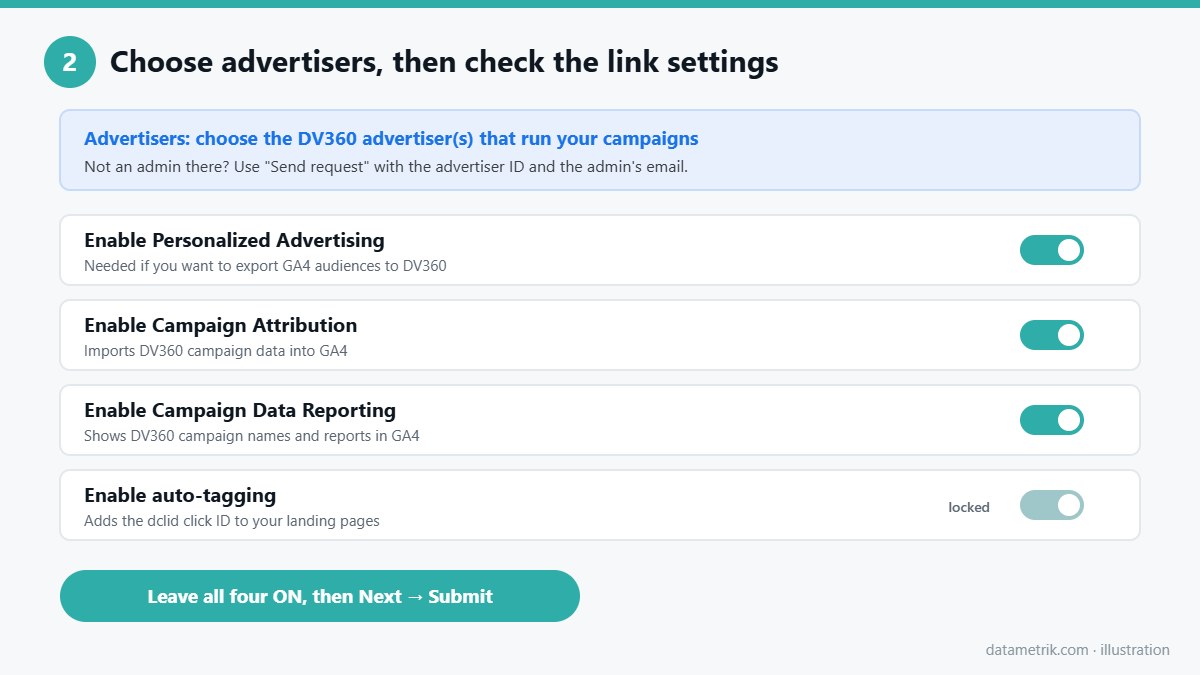
Step 2: Choose your advertiser and keep the settings on
Click Choose advertisers and tick your DV360 advertiser.
Not an admin there? Click Send request instead.
Enter the advertiser ID and the admin’s email.
Next, look at the link settings.
Leave all of them turned on.
Auto-tagging is always on here. You cannot switch it off.
Click Next, then Submit.
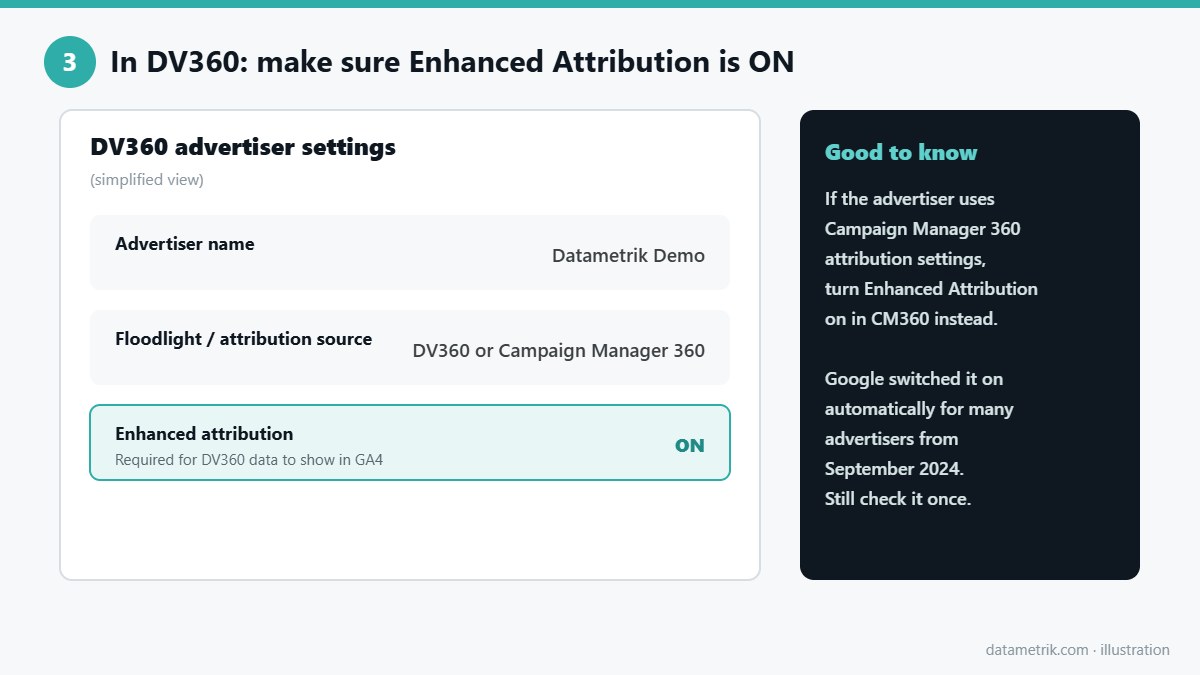
Step 3: Check Enhanced Attribution in DV360
This is the step most people miss.
Google says DV360 data needs Enhanced Attribution to show in GA4.
Open your DV360 advertiser settings and check it is on.
Does your advertiser use Campaign Manager 360 attribution settings?
Then turn it on in CM360 instead.
Google switched it on for many advertisers from September 2024.
Still check it once. It takes 30 seconds.
Step 4: Run a test click
Click one of your live DV360 ads.
Look at the landing page address in your browser.
You should see dclid= in it.
No dclid? Jump to the (not set) section.
Give GA4 24 to 48 hours to show the data.
How to see First user DV360 campaign name in GA4
Option A: The User acquisition report
Go to Reports → Acquisition → User acquisition.
Click the dimension name above the table.
Search for “First user DV360 campaign name” and select it.
Option B: Explorations (more flexible)
Go to Explore and start a Free form exploration.
Under Dimensions, click the plus sign.
Search for “first user dv360”.
Tick First user DV360 campaign name and click Import.
Add metrics like New users, Key events and Total revenue.
Drag the dimension to Rows and the metrics to Values.
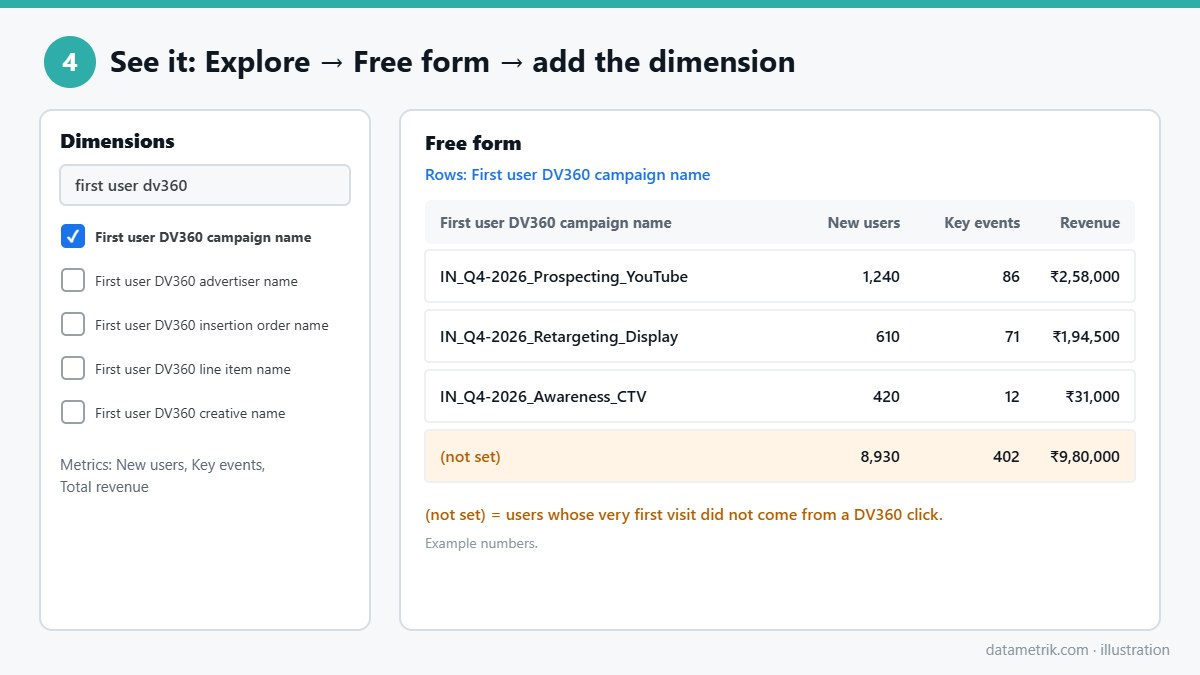
You can also add insertion order, line item and creative names.
Each one has its own “First user” version.
Developers: the Data API name is firstUserDv360CampaignName.
Every DV360, CM360 and SA360 dimension in GA4
Campaign name is only one of many Google Marketing Platform dimensions in GA4.
GA4 also has dimensions for DV360 creatives, line items and exchanges.
It has the same for Campaign Manager 360 and Search Ads 360.
They all follow one naming rule.
Learn the rule once, and you can read any of them.
The rule: “First user”, “Session”, or no prefix
| Name starts with | Example | Question it answers |
|---|---|---|
| First user | First user DV360 creative ID | What brought this person to us the first time? |
| Session | Session DV360 line item name | What started this particular visit? |
| No prefix | DV360 advertiser name | What gets credit for a key event, like a purchase? |
So “First user DV360 creative ID” is the creative behind someone’s first visit.
“Session DV360 campaign name” is the campaign behind one single visit.
And “DV360 campaign name”, with no prefix, is linked to key events.
Every dimension in the tables below comes in all three versions.
DV360 dimensions
These fill after you link DV360 to GA4, as shown in the steps above.
| Dimension | What it shows |
|---|---|
| DV360 partner name / ID | The DV360 partner, usually the agency or brand seat |
| DV360 advertiser name / ID | The DV360 advertiser, usually the brand |
| DV360 campaign name / ID | The DV360 campaign |
| DV360 insertion order name / ID | The insertion order, where budget and pacing live |
| DV360 line item name / ID | The line item, where bids and targeting live |
| DV360 creative name / ID | The ad creative that was clicked |
| DV360 creative format | The type of creative, such as video, native or expandable |
| DV360 exchange name / ID | The ad exchange that sold the impression |
| DV360 source | The site where the ad was shown |
| DV360 medium | The billable outcome of the insertion order, such as CPM |
| DV360 source / medium | Source and medium together, in one field |
Tip: use IDs when you join GA4 data with DV360 reports.
IDs stay the same, even if someone renames a campaign.
Also note that DV360 source / medium is not GA4’s normal source / medium.
It only describes the DV360 ad click.
CM360 dimensions
Campaign Manager 360 has its own set.
They fill when CM360 is linked to GA4.
In GA4, go to Admin → Product links → Campaign Manager 360 links.
| Dimension | What it shows |
|---|---|
| CM360 account name / ID | The CM360 account |
| CM360 advertiser name / ID | The advertiser inside CM360 |
| CM360 campaign name / ID | The CM360 campaign |
| CM360 placement name / ID | The placement, meaning where the ad was booked to run |
| CM360 site name / ID | The site where the ad space was bought |
| CM360 creative name / ID | The creative that served |
| CM360 creative format / type | The kind of creative, such as display or tracking |
| CM360 creative version | The version number of the creative |
| CM360 rendering ID | The ID of one specific rendering of the creative |
| CM360 placement cost structure | How the media cost is calculated, such as CPM |
| CM360 source | The site name |
| CM360 medium | The placement cost structure |
| CM360 source / medium | Source and medium together |
Many teams run DV360 buys through CM360 ad tags.
In that case, check both sets of dimensions.
Need the CM360 side set up first? Read our Floodlight setup guide.
SA360 dimensions
Search Ads 360 dimensions cover paid search.
They fill when SA360 is linked to GA4.
In GA4, go to Admin → Product links → Search Ads 360 links.
| Dimension | What it shows |
|---|---|
| SA360 campaign / campaign ID | The SA360 campaign (GA4 labels the name just “SA360 campaign”) |
| SA360 ad group name / ID | The ad group inside that campaign |
| SA360 keyword text | The keyword that matched the search |
| SA360 query | The exact search the user typed |
| SA360 creative format | The layout or design of the ad |
| SA360 engine account name / ID / type | The search engine account, such as Google Ads or Microsoft Advertising |
| SA360 manager account name / ID | The top-level SA360 manager account |
| SA360 source | The site where the search happened |
| SA360 medium | The payment model, such as CPC |
| SA360 source / medium | Source and medium together |
First user campaign vs manual campaign vs DV360 campaign
These three names confuse a lot of people.
Here is the difference in one table.
| Dimension | Where the value comes from |
|---|---|
| First user campaign / campaign ID | The campaign that first brought the user, from any channel. It includes Google Ads, manual and other campaigns. |
| First user manual campaign name | Only the utm_campaign value in your landing page URL |
| First user manual campaign ID | Only the utm_id value in your landing page URL |
| First user DV360 campaign name | Only the DV360 campaign, read from the DV360 click |
Use the DV360 version for DV360 reporting.
Use the manual versions to check your UTM tags.
Use first user campaign to compare all channels side by side.
How to find any of these in GA4
Open a free form exploration.
Click the plus sign next to Dimensions.
Type “dv360”, “cm360” or “sa360” in the search box.
GA4 lists every matching dimension, in all three versions.
Developers can use the same names in the Data API.
Add the prefix to the name, like firstUserDv360CreativeId or sessionDv360LineItemName.
Others follow the same pattern, like firstUserCm360RenderingId and firstUserSa360CampaignName.
Why you see (not set), and how to fix it
Work through these checks in order.
Most people stop at the first one.
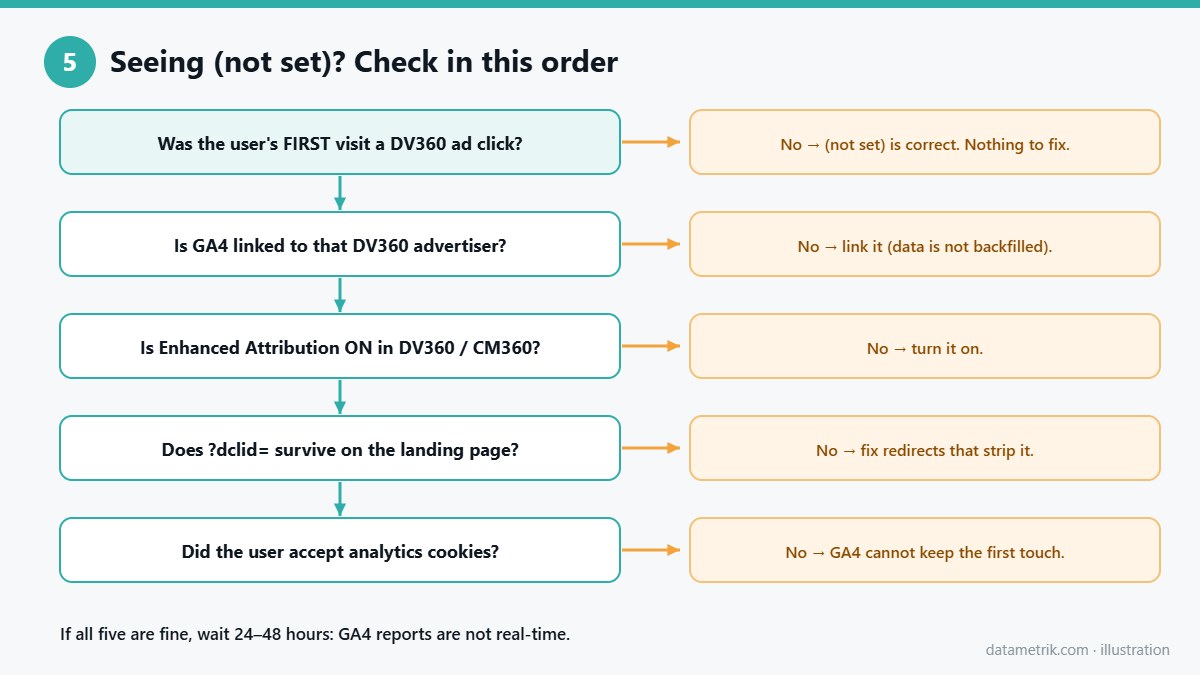
1. The user did not first arrive from a DV360 click
This is the most common reason, and it is fine.
A user who first came from Google search has no DV360 campaign.
So GA4 shows “(not set)” for them.
Tip: exclude “(not set)” to see only DV360-acquired users.
2. GA4 is not linked, or was linked recently
Without the link, GA4 cannot read DV360 names.
Unlinked DV360 clicks often land in Direct or Unassigned.
Data from before the link date stays empty.
Use DV360’s own reports for those older dates.
3. Enhanced Attribution is off
Go back to Step 3 and check it in DV360 or CM360.
4. A redirect removes the dclid
Some sites redirect visitors before GA4 loads.
For example, from http to https, or through a tracking link.
Some redirects drop everything after the “?”.
Click your ad and check the final page address.
The dclid must still be there when GA4 loads.
5. The user declined analytics cookies
With Consent Mode, GA4 may not keep the user’s identity.
Then it cannot connect later visits to the first touch.
These users can show as “(not set)”.
6. Your UTM tags are incomplete
Many teams also add UTM tags to DV360 landing pages.
That is allowed, but auto-tagged values win.
GA4 falls back to UTMs only if the click ID cannot be used.
If you add UTMs, add all of them.
That means source, medium and campaign at the very least.
Google warns that missing UTM parts show as “(not set)”.
A DV360 naming convention that makes GA4 easy
GA4 shows your DV360 campaign name exactly as you typed it.
Messy names make messy reports.
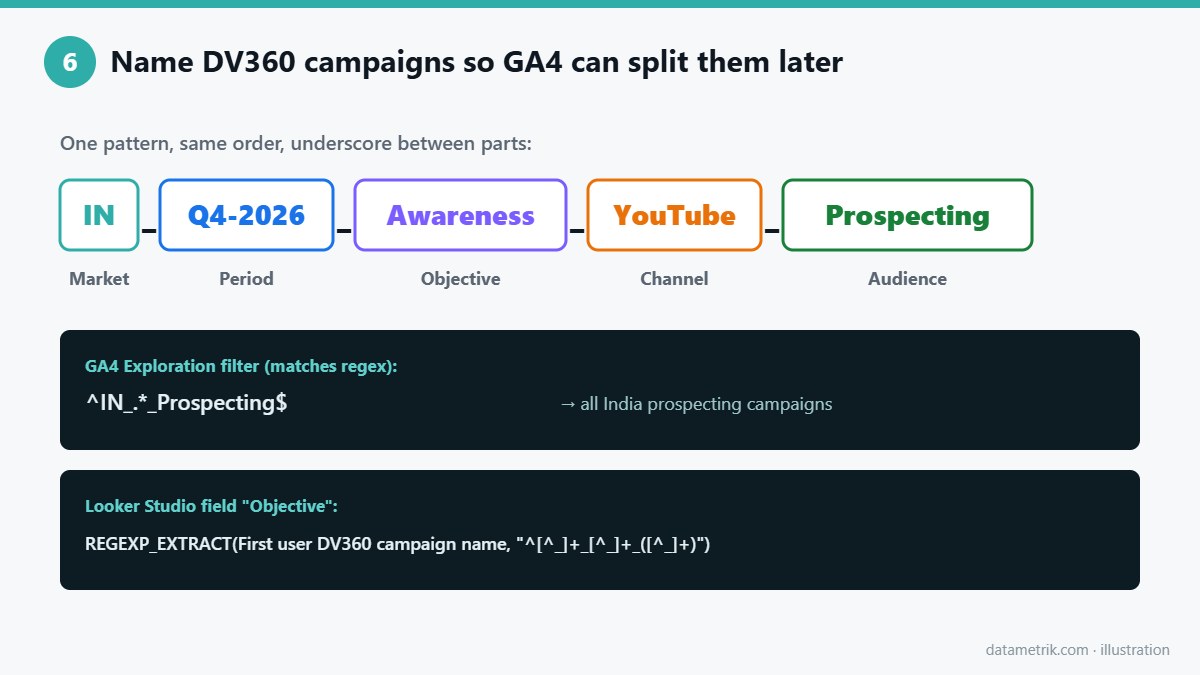
Use one pattern for every campaign.
Keep the parts in the same order every time.
Put an underscore between each part.
Example: IN_Q4-2026_Awareness_YouTube_Prospecting
| Part | Example | Why it helps |
|---|---|---|
| Market | IN | Split results by country |
| Period | Q4-2026 | Compare quarters easily |
| Objective | Awareness | Group by funnel stage |
| Channel | YouTube | Compare YouTube, display and CTV |
| Audience | Prospecting | Separate new vs returning audiences |
Now you can filter in GA4 with “matches regex”.
^IN_.*_Prospecting$This keeps every India prospecting campaign.
In Looker Studio, you can pull out one part:
REGEXP_EXTRACT(First user DV360 campaign name, "^[^_]+_[^_]+_([^_]+)")This returns the third part, the objective.
Use the same pattern for insertion orders and line items.
Setting up a campaign right now?
Read our DV360 video reach campaign setup guide.
Common mistakes to avoid
| Mistake | What happens | Fix |
|---|---|---|
| Comparing first user and session numbers | They never match | Compare the same scope |
| Treating all “(not set)” as broken | Wrong conclusions | Exclude it, then check the rest |
| Skipping Enhanced Attribution | No DV360 data in GA4 | Turn it on in DV360 or CM360 |
| Every team names campaigns differently | You cannot group them | One naming pattern for all |
| Expecting old data after linking | Past dates stay empty | Use DV360 reports for older dates |
GA4 and DV360 numbers still differ? See why CM360 and DV360 numbers don’t match.
FAQ
What is First user DV360 campaign name in GA4?
It is a user-scoped GA4 dimension. It shows the Display & Video 360 campaign that first brought a user to your site or app. It does not change on later visits.
Why does First user DV360 campaign name show (not set)?
Usually because that user’s first visit did not come from a DV360 ad click. Other causes are a missing GA4–DV360 link, Enhanced Attribution being off, redirects that strip the dclid, declined analytics cookies, or incomplete UTM tags.
What is the difference between First user and Session DV360 campaign name?
First user DV360 campaign name is fixed to the user’s first visit. Session DV360 campaign name shows the DV360 campaign that started each visit, so it can change from visit to visit.
Do I need UTM parameters for DV360 in GA4?
No. Once GA4 is linked to DV360, auto-tagging adds the dclid click ID for you. If you also add UTMs, GA4 uses the auto-tagged values first and only falls back to UTMs when the click ID cannot be used.
Does it count people who saw the ad but did not click?
No. It is filled from the click that lands on your site. A person who only saw the ad and later arrived from search is credited to that later source in this dimension.
How long does data take to appear?
Usually 24 to 48 hours after the link is live. Data from before the link date is not added later.
What is First user DV360 creative ID in GA4?
It is the ID of the DV360 creative behind a user’s first visit. It fills only when GA4 is linked to DV360. A Session version and a key event version also exist.
What is Session DV360 campaign name?
It shows the DV360 campaign that started one session. Unlike the First user version, it can change on every visit.
What is First user SA360 campaign in GA4?
It is the Search Ads 360 campaign that first brought a user to your site. It fills only after you link SA360 to GA4.
What is First user CM360 rendering ID?
It is the ID of the Campaign Manager 360 creative rendering behind a user’s first visit. It needs a CM360 link in GA4.
What is the difference between First user campaign and First user manual campaign name?
First user campaign covers any channel, including Google Ads and UTM-tagged campaigns. First user manual campaign name only shows the utm_campaign value from your URL.
Key takeaways
- First user DV360 campaign name shows the DV360 campaign behind a user’s first visit.
- It fills only after you link GA4 to DV360.
- Enhanced Attribution must be on in DV360 or CM360.
- “(not set)” is normal for users who arrived first through other channels.
- A clean naming pattern turns this dimension into easy reports.
Preparing for a DV360 or programmatic interview?
Questions like this come up in real interviews.
Take the free DV360 mock test (25 timed questions).
Or get every answer in Cracking the Programmatic Interview.
Related reading
- DV360 video reach campaigns: setup guide
- Floodlight in Campaign Manager 360: setup guide
- CM360 vs DV360 discrepancy explained
- Track third-party purchases in GA4
- DV360 certification study guide
Sources
Written By
Chetna leads content creation at Datametrik, turning complex programmatic workflows, ad operations, paid media strategies, and SEO frameworks into practical, step-by-step guides.
Technically Reviewed & Verified By
Every Datametrik guide is audited for live platform accuracy, bidding mechanics, and tracking setup by our technical editors with programmatic media buying and Ad Ops experience across WPP, Cognizant, and Dentsu.

Comments are closed.